📋 In This Article
Disclosure: This article contains affiliate links. I may receive a commission or bonus if you sign up through my link. I only recommend tools I personally test and use at Tryamba.
QUICK VERDICT — SEMRUSH KEYWORD RESEARCH MISTAKES 2026
7
mistakes to fix
60 Minutes
to implement all fixes
Intermediate
blogger level
Who This Is For: Intermediate bloggers already using Semrush but stuck on page 2 or 3. You do the research, publish the articles, and wonder why the rankings are not moving.
What You Will Fix: 7 specific errors inside the Semrush interface — each tied to an exact feature, filter, or tab you are likely skipping right now.
Tool Required: Semrush (any paid plan). If you are still on the free plan, the 7-day trial below gives you full access to every feature mentioned in this guide at $0.00 today.
→ Start Semrush Free Trial — $0.00 TodayNo charge today · Full platform access · Cancel before Day 7
The Semrush Problem Nobody Talks About
You have been using Semrush for months. You pick the keywords, write the articles, and watch them sit on page 3 collecting dust. The Semrush keyword research looks solid on paper. The content is well-written. But the rankings are not moving — and you cannot figure out why.
I have been running keyword research in Semrush every single day for over four years at Tryamba. And I made almost every mistake I am about to describe. Some of them cost me months of ranking progress on articles I had invested real hours into. One mistake in particular kept three articles stuck on page 2 for four months before I caught it — and the fix took thirty minutes.
Here is the honest truth: the problem is rarely Semrush itself. The tool is genuinely one of the most powerful on the market. The problem is that Semrush hands you a firehose of data and expects you to know which filters to apply, which tabs to open, and which numbers to actually trust. Without that knowledge, the data points you in the wrong direction every single time.
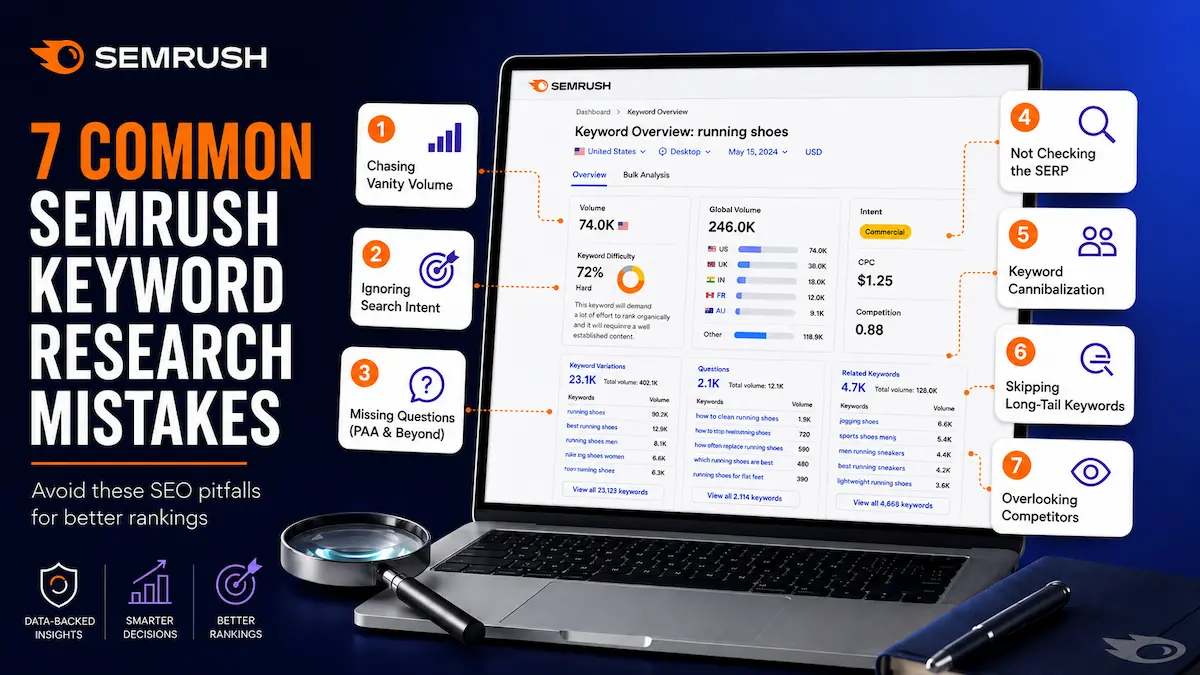
I have mapped out seven specific mistakes — each tied to an exact location inside Semrush — responsible for most of the ranking failures I have seen and fixed over the past four years. If you already have Semrush, open it alongside this guide. Every fix I describe takes less than five minutes to implement in your next research session.
Mistake 1: Chasing High-Volume “Vanity” Keywords
You open the Keyword Magic Tool, sort the results by Volume, and start writing down the biggest numbers. A term with 40,000 monthly searches goes on the list. One with 90,000? Even better. This is the most natural instinct in keyword research — and it is the fastest way to spend six months publishing articles that rank nowhere.
The trap is straightforward: high volume almost always means high competition. When I started Tryamba, I published twelve articles targeting keywords with 20,000–50,000 monthly searches. Not one reached page one. They sat between positions 28 and 45 for months, invisible to everyone searching for the topics I had covered.
Chasing those keywords is like a local bakery trying to outbid McDonald’s for a Times Square billboard. The numbers look exciting until you realize the competition has a decade-long head start, thousands of backlinks, and a domain authority your site will not match for years. Meanwhile, the achievable keywords — the ones where you could rank in the top 3 within ninety days — are sitting right below a filter you have never applied.
Mistake 2: Ignoring the Search Intent Column
Semrush has an “Intent” column in the Keyword Magic Tool with a coloured letter next to every keyword. Most intermediate bloggers scroll straight past it. This single column is often the entire difference between an article that ranks in ninety days and one that never ranks at all — regardless of how good the writing is.
According to Google’s own documentation on how search works, matching user intent is one of the most fundamental ranking signals. Semrush labels every keyword with one of four codes:
- I — Informational: The user wants to learn something. Write a tutorial, guide, or “how-to” article.
- C — Commercial: The user is comparing options before buying. Write a review, a “best of” list, or an “X vs Y” comparison.
- T — Transactional: The user is ready to act. Create a landing page, a deal page, or a free trial activation guide with a strong CTA.
- N — Navigational: The user is looking for a specific website. Do not target these — you cannot win them.
The classic failure: you find a keyword labelled Commercial (C) and write an informational blog post because that is what you are comfortable producing. Google compares your page to the ten results already ranking — all of which are comparison articles or reviews — and buries yours on page 4. No amount of on-page SEO rescues an intent mismatch. I learned this the hard way with two articles I spent days writing that never moved past position 30.
Mistake 3: Never Clicking the Questions Tab
There is a “Questions” tab sitting directly at the top of the Keyword Magic Tool results area — right next to “All Keywords.” I used Semrush for almost eight months before I clicked it. That was eight months of leaving some of the easiest ranking opportunities in my niche completely untouched.
When you only work in the “All Keywords” view, you see head terms and short phrases. What you miss is the entire layer of conversational, long-tail questions your target reader is typing into Google right now. In 2026, with AI Overviews answering an increasing percentage of informational searches, question-based queries are your fastest path to Featured Snippets and AI Overview citations — both of which drive clicks even when you are not ranking #1.
Think of it this way. The main keyword list is a big fishing net — but most of the fish are already caught by authority sites with thousands of backlinks. The Questions tab is a fine-mesh net that catches what the big nets miss: specific, intent-driven queries that a focused blog with genuine topical authority can actually win.
Mistake 4: Skipping the Manual SERP Reality Check
Semrush shows you a keyword’s KD% score and volume estimate. What it cannot fully show you is the type of content dominating the live search results page right now. A keyword can look perfectly winnable on paper and be a complete dead end in practice — and you will only know if you check.
I spent three months writing long-form blog articles for keywords where the entire top 10 was YouTube videos. My articles were well-written and properly optimised. They went nowhere. Semrush showed a KD% of 22 — which looked achievable. The SERP was telling a completely different story, and I never checked it. That was three months of wasted effort I could have redirected to keywords where written content actually wins.
Other SERP surprises that change everything: Reddit and Quora threads filling the top positions (a huge opportunity — no authoritative professional guide exists yet), official product pages dominating every spot (navigational intent — skip it entirely), or a Featured Snippet box sitting at the top that you can specifically target with a structured answer format. None of this is visible from Semrush’s keyword data alone.
STILL ON THE FREE PLAN?
All 7 Fixes Require a Paid Semrush Feature
The KD% filter, Questions tab, SERP panel, Keyword Strategy Builder, and Position Tracking are all locked on the free plan. The 7-day trial unlocks every one of them — $0.00 today, no charge until Day 8.
Cancel before Day 7 and pay nothing. I have used this trial process myself — it works exactly as described.
→ Start Semrush Free Trial ($0.00 Today)No charge until Day 8 · Cancel any time · Full access to every feature
Mistake 5: Treating KD% as an Absolute Block
This is the opposite of Mistake 1 — and equally damaging. After reading “only target keywords with KD% under 30,” many intermediate bloggers start abandoning every keyword above 35. They see KD% 48 and remove it from the list without a second thought. That is leaving real, achievable ranking opportunities behind every single research session.
Keyword Difficulty is a relative score, not an absolute wall. It estimates the average backlink profile strength of the pages currently ranking for a term. It does not account for your site’s topical authority, how fresh the existing results are, or whether the current top-10 content actually answers the search query well. Semrush’s algorithm cannot see any of that — only you can, after running the SERP check from Mistake 4.
I have ranked Tryamba articles for keywords at KD% 55 because the existing top results were two years old and genuinely shallow. My article was more current, more specific, and more useful for the actual search intent. Semrush gave me a difficulty score of 55. The SERP showed me a door left wide open. KD% told me to avoid it. The SERP told me to walk right through.
Mistake 6: Publishing Pages That Cannibalise Each Other
You have two articles on your site. One titled “SEO tips for beginners” and another called “Beginner SEO guide 2026.” They look like different pieces of content to you. To Google, they represent the same search intent and the same query — and they are silently fighting each other for the same ranking position.
This is keyword cannibalization. Both pages compete against each other. Google cannot decide which one to show, so it shows neither at full strength. You are splitting your ranking authority in half — and in some cases both pages get pushed out of the top positions entirely. The content effort you put into both articles effectively cancels itself out.
This happened to me at Tryamba. Two well-written articles were cannibalising each other’s rankings for over four months before I caught it using the Keyword Strategy Builder. The fix took thirty minutes. The ranking recovery took another six weeks — six weeks of lost traffic I could not get back. Catching this before you publish costs nothing. Catching it afterward costs time you do not have.
Mistake 7: Publishing and Never Looking Back
You research the keyword. You write the article. You hit publish. Then you move on to the next topic and never look at that article again. This single habit — more than any other on this list — is responsible for the gap between bloggers whose traffic compounds year after year and those whose traffic plateaus and stays flat.
Without tracking, you never know which articles are sitting at position 12 — one targeted internal link away from page one. You never catch the moment a competitor refreshes their article and takes back a ranking you had earned. You never spot the keywords where you are ranking #15 and need only a single additional section to break into the top 5. Publishing without tracking is like planting seeds and never coming back to water them.
The content refresh is one of the highest-ROI activities available to any affiliate blogger. An existing article already has Google’s trust, existing backlinks, and indexed history. A targeted update — not a full rewrite, just a focused addition — regularly pushes page 2 articles to page 1 in thirty to sixty days. Semrush’s Position Tracking makes this process systematic instead of guesswork. Most intermediate bloggers never set it up.
All 7 Mistakes — Quick Reference
Bookmark this table and run through it before your next keyword research session. Every item maps to a specific Semrush tool location.
| # | Mistake | The Fix | Where in Semrush |
|---|---|---|---|
| 1 | Chasing high-volume keywords | KD% filter → max 30% | Keyword Magic Tool → Filters → KD% |
| 2 | Ignoring Intent labels | Match content type to Intent column | Keyword Magic Tool → Intent column |
| 3 | Skipping Questions tab | Click Questions tab every session | Keyword Magic Tool → Questions tab |
| 4 | No SERP reality check | Click SERP icon before shortlisting | Keyword Magic Tool → SERP icon |
| 5 | Treating KD% as absolute | Combine KD% with SERP quality check | KD% filter + SERP panel together |
| 6 | Keyword cannibalization | Check Strategy Builder clusters first | Keyword Strategy Builder |
| 7 | No Position Tracking | Set up tracking on publish day | Projects → Position Tracking |
📧 Get My Keyword Research Checklist — Free
I built a printable checklist of every step I run through before starting any article at Tryamba — every filter setting, tab check, and SERP question from this guide in one page. Subscribe to the Tryamba newsletter and I will send it to your inbox immediately.
Free on subscribe: Keyword Research Checklist + SEO Launch Checklist + Google Ranking Cheat Sheet
→ Get the Free Checklist InstantlyFrequently Asked Questions
What is the most common Semrush keyword research mistake?
The most common mistake is sorting keywords by volume and targeting the highest numbers without applying a Keyword Difficulty filter. Most intermediate bloggers pick terms with KD% 60–80 they have near-zero chance of ranking for. The fix: apply the KD% filter set to a maximum of 30 in the Keyword Magic Tool and focus on keywords with 300–1,500 monthly searches. One well-ranked low-competition keyword consistently outperforms ten high-volume keywords that never reach page one.
How do I find low competition keywords in Semrush?
Open the Keyword Magic Tool, enter your seed keyword, and apply the KD% filter with a maximum of 30. Sort results by Volume descending. Also click the Questions tab to surface long-tail question keywords with even lower competition and Featured Snippet potential. These two steps together reveal the keywords where a mid-authority blog can realistically rank within 90 days — the ones most bloggers never find because they stop at the default “All Keywords” view.
What do the search intent labels mean in Semrush?
Semrush labels every keyword with four intent types in the Keyword Magic Tool: I (Informational — user wants to learn), C (Commercial — comparing options before buying), T (Transactional — ready to act or purchase), and N (Navigational — looking for a specific website). Your content format must match the intent label exactly. Publishing an informational article for a commercial keyword is one of the most reliable ways to guarantee a page never ranks — regardless of content quality, writing skill, or on-page SEO.
What is keyword cannibalization and how do I detect it in Semrush?
Keyword cannibalization happens when two pages on your site compete for the same search query, causing both to rank below their potential. Use Semrush’s Keyword Strategy Builder — if two target keywords fall into the same topic cluster, they belong on one page, not two separate articles. Publishing two articles for the same cluster is the direct cause of most cannibalization problems. For existing issues, Position Tracking will show you when multiple pages are simultaneously competing for the same keyword.
Is a Semrush KD% of 50 too difficult to rank for?
No. A KD% of 50 is moderately competitive but not a hard barrier. Sites with solid topical authority regularly rank for KD% 40–60 keywords when the current SERP results are outdated or thin. Always combine the KD% score with a manual SERP check — if the existing top-10 results are shallow, two or three years old, or fail to match the actual search intent, a well-structured article from an established blog can outrank them even at KD% 55. The number is a guide, not a gate.
Fix All 7 Mistakes in Your Next Semrush Session
Every fix in this guide uses features already inside Semrush. Nothing extra to buy, no outside tools needed. Apply the KD% filter. Check the Intent column. Click the Questions tab. Run the SERP check. Use the Strategy Builder. Set up Position Tracking. These are the fundamentals most intermediate bloggers skip — and skipping them is exactly why traffic does not move.
→ Try Semrush Free for 7 Days — $0.00 TodayNo charge today · Full platform access · Cancel before Day 7 · Verified May 2026
Have a specific question about your Semrush keyword research workflow? Drop it in the comments below — I answer based on four years of running Semrush on real affiliate projects at Tryamba.

Dhrubo M — Founder, Tryamba.com
4+ years testing SEO & hosting tools
50+ tools reviewed | 100+ articles published
Verified Semrush Affiliate Partner
━━━━━━━━━━━━━━━━━━━━━━━━
I've been running for 4+ years covering SEO, web hosting, AI tools, and affiliate marketing. I personally test every tool I write about, including Hostinger, NameHero, Namecheap, Semrush, InVideo, and Fiverr. My goal is simple: give you honest, experience-backed advice that actually helps you grow online.
🔥 Top Recommendation
Semrush One
7-Day Free Trial
$0.00 Today · Full Access
✅ Cancel anytime before Day 7