QUICK ANSWER — SEMRUSH KEYWORD MAGIC TOOL 2026
27.3B
keywords in database
11 Steps
complete walkthrough
4+ Years
personally tested
What You Will Learn: How to use the Semrush Keyword Magic Tool to find low-competition keywords your competitors are missing — including the exact filter settings I use at Tryamba to build a content calendar from scratch.
Who This Is For: Bloggers and affiliate marketers who want to stop guessing what to write and start building content around keywords that actually rank and convert.
What You Need: A Semrush account — or the 7-day free trial below which gives you full access to every filter and feature covered in this guide at $0.00 today.
→ Try the Semrush Keyword Magic Tool Free for 7 DaysNo charge today · Full access to all filters · Cancel before Day 7
The Semrush Keyword Magic Tool is the single feature I use more than anything else at Tryamba. In four years of building content around affiliate keywords, it has helped me find the exact search terms that rank, the ones that convert readers into buyers, and the ones my competitors are somehow missing — all before writing a single word. This guide walks through every feature, step by step, so you can do exactly the same.
What Is the Semrush Keyword Magic Tool — And Why Does It Matter in 2026?
Imagine walking into a library with 27.3 billion books. Every book is a keyword someone has typed into Google. You need to find the exact books your target readers are searching for — and you need to find them before your competitors do.
That is exactly what the Semrush Keyword Magic Tool does. It takes one word or phrase you give it — called a seed keyword — and instantly generates thousands of related keyword ideas, complete with search volume, difficulty scores, search intent, and competitive data.
I have been using this tool at Tryamba for four years. In that time, it has helped me find the exact keywords that rank, the ones that convert affiliate readers into buyers, and the ones my competitors are somehow missing. This guide walks you through every feature — step by step — so you can do the same.
No charge today · Full access · Cancel before Day 7
How to Use the Semrush Keyword Magic Tool — Step by Step
Step 1: Log In and Open the Tool
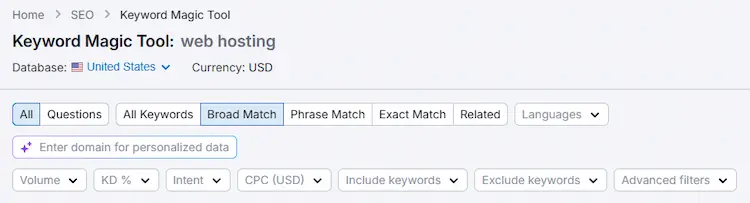
Log in to your Semrush account. In the left sidebar, click SEO → Keyword Research → Keyword Magic Tool.
If you do not have an account yet, start a 7-day free trial — you get full access to the Keyword Magic Tool including all filters and export features at no charge.
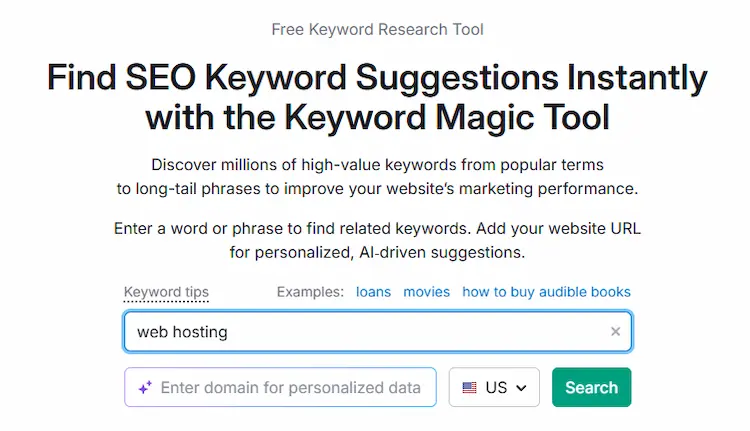
Step 2: Enter Your Seed Keyword
Type a broad 2–3 word topic into the search bar. Think of the seed keyword as the starting point of your research — keep it broad enough to generate thousands of ideas.
Good seed keywords:
- web hosting
- affiliate marketing
- email marketing tools
- WordPress plugins
Too specific:
- best web hosting for bloggers in 2026 with free domain
Broad seeds generate more ideas. You will narrow them down in the next steps. Select your target country from the dropdown — choose the country where most of your readers are based. For most Tryamba readers, this is the United States. Click the green Search button.
Step 3: Understand the Results Table
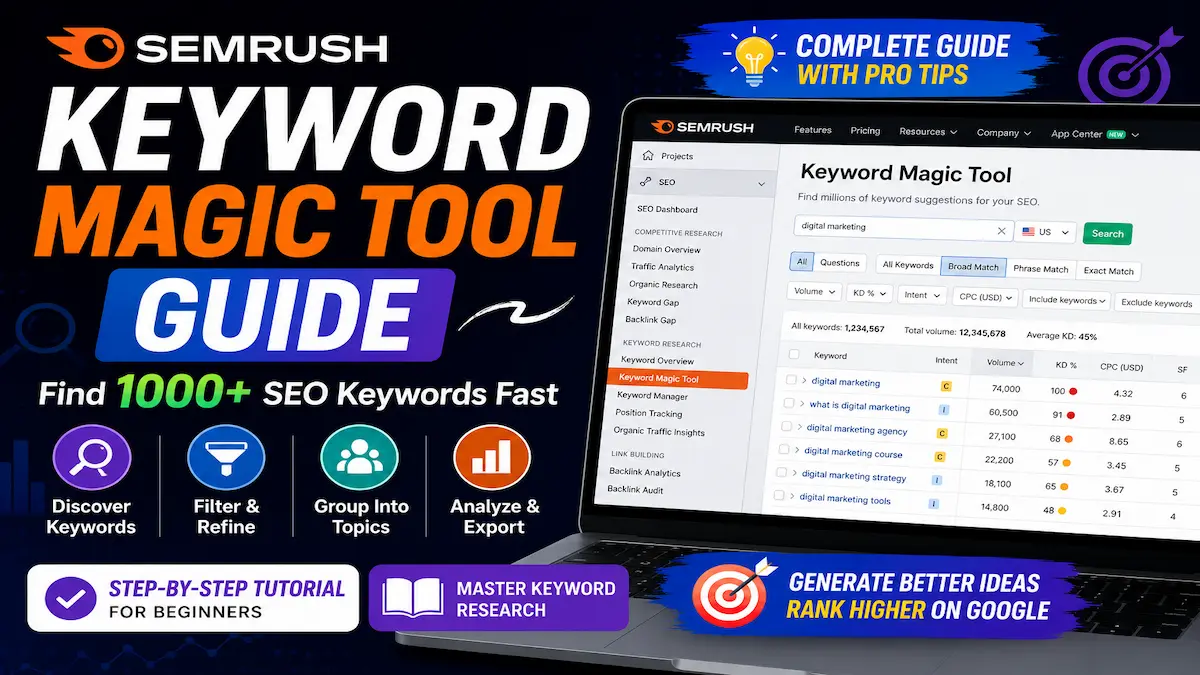
The tool returns a table with every keyword related to your seed. Each row shows:
- Keyword: The exact search phrase
- Intent: Informational, Commercial, Transactional, or Navigational
- Volume: Average monthly searches over 12 months
- KD%: Keyword Difficulty — how hard it is to rank on page 1
- CPC: Cost per click for paid ads — high CPC signals high buyer intent
- SERP Features: Whether featured snippets, FAQs, or videos appear for this keyword
For a seed keyword like “web hosting,” you might see 200,000+ keyword ideas. The next steps show you how to filter this down to your best opportunities.
Step 4: Choose Your Match Type
At the top of the results table, you see four match type buttons:
- Broad Match: All keywords containing your seed in any variation — most results
- Phrase Match: Keywords containing your exact seed phrase — medium results
- Exact Match: Only keywords with your seed in the exact same form — fewest results
- Related: Semantically related keywords — great for topical coverage
For finding content ideas, start with Broad Match. For building internal linking clusters, use Related.
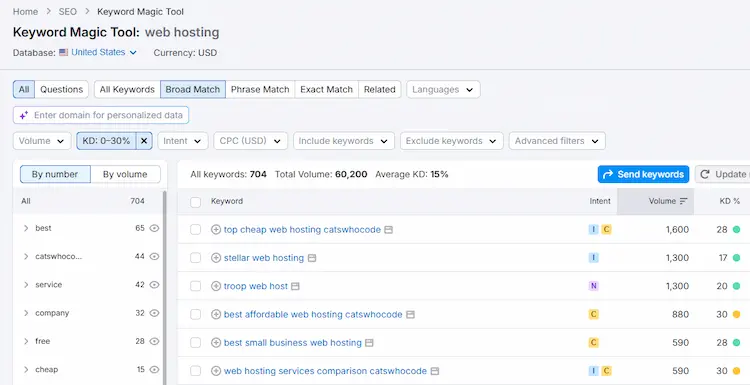
Step 5: Filter by Keyword Difficulty (KD%)
This is the most important filter for bloggers. Click the KD% filter and set the maximum to 30%.
Here is what the scores mean:
| KD% Range | Difficulty | What It Means for Tryamba |
|---|---|---|
| 0–14% | Very Easy | Write it immediately — almost no backlinks needed |
| 15–29% | Easy | Write with good on-page SEO — realistic for a 4-year blog |
| 30–49% | Medium | Possible with strong internal linking and good content |
| 50%+ | Hard | Dominated by large authority sites — avoid for now |
Setting KD% maximum to 30% eliminates the keywords where Forbes, HubSpot, and Semrush itself dominate. What remains are the keywords a growing blog can realistically rank for.
Step 6: Filter by Search Intent
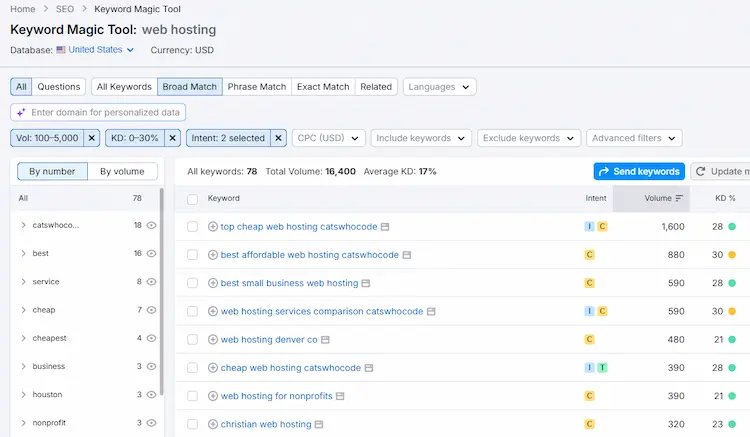
Click the Intent filter. Understanding search intent is one of the most important skills in SEO — and the Semrush Keyword Magic Tool labels every keyword automatically so you never have to guess. According to Google’s own documentation on how search works, matching content to user intent is fundamental to ranking.
For affiliate bloggers, choose:
- Commercial (C): Readers comparing products — your affiliate sweet spot. Example: “best web hosting for bloggers”
- Transactional (T): Readers ready to buy — highest converting. Example: “hostinger coupon code”
Avoid Navigational (N) keywords — these are people looking for a specific brand’s website, not your content. Informational (I) keywords are good for topical authority and ad revenue, but convert less often for affiliate sales.
READY TO RUN YOUR FIRST SEARCH?
Access All Filters With the 7-Day Free Trial
The KD% filter, Intent filter, Questions tab, SERP Features, and Export — all locked on the free plan. The 7-day trial unlocks every feature in this guide at $0.00 today. No charge until Day 8.
Cancel before Day 7 and pay nothing. I use this exact trial process myself every time I test Semrush on a new project.
→ Start Your 7-Day Free Trial and Run Your First SearchNo charge until Day 8 · Cancel any time · Full access to every feature
Step 7: Filter by Search Volume
Set the Volume filter to a minimum of 100 and maximum of 5,000.
Why not target high volume keywords? Because any keyword above 5,000 monthly searches is almost always dominated by large sites. Keywords between 500–5,000 with KD under 30% are your “goldmine” — enough traffic to be meaningful, low enough competition to actually rank.
Step 8: Explore Keyword Groups in the Left Sidebar
On the left side of the results, you see keyword groups — clusters of related terms organised by shared themes. This is one of the most underused features of the tool.
Click any group to see only keywords in that cluster. Each group shows:
- Total Volume — combined monthly searches for all keywords in the group
- Average Difficulty — average KD% across the group
Groups with high Total Volume and low Average Difficulty are your best content opportunities. These represent entire subtopics you can cover with a cluster of articles.
Expand any group to see subgroups — up to three levels deep. This is how I map out entire content clusters at Tryamba before writing a single word.
Step 9: Find Question Keywords
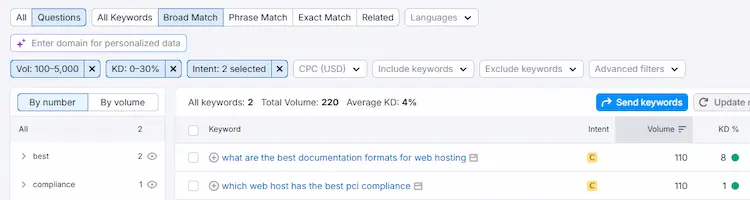
Click the Questions button at the top of the results table. This filters the results to show only keywords phrased as questions.
Question keywords are valuable for two reasons:
- They often trigger Featured Snippets in Google — putting your site above position 1
- They match exactly what readers type into AI systems like ChatGPT and Gemini in 2026
Use these questions for your FAQ sections. A well-written answer to a question keyword in your FAQ is one of the fastest paths to appearing in Google’s AI Overviews.
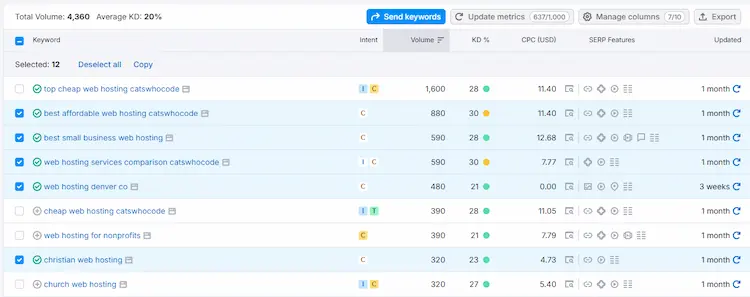
Step 10: Check SERP Features
The SF (SERP Features) column shows which special results appear for each keyword — featured snippets, image packs, video results, FAQ boxes, and more.
Look for keywords with Featured Snippet icons. If a featured snippet already exists for that keyword, it means Google is actively pulling answers from articles. Write a better, more direct answer and you can claim that snippet — which often gets more clicks than the #1 organic result.
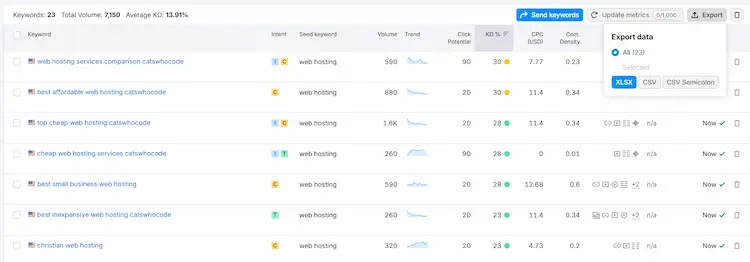
Step 11: Export Your Keywords
Once you have filtered your results to your best opportunities, click the Export button in the top right. Choose CSV or XLSX.
I export to a spreadsheet and sort by:
- KD% (lowest first)
- Volume (highest first within each KD% tier)
- Intent (Commercial and Transactional first)
This gives me a prioritised content calendar. The keywords at the top of the list are the ones I write first.
My Real Keyword Research Workflow at Tryamba
Here is the exact process I use when planning new content for Tryamba. I run this every time I start a new content cluster — it takes about 20 minutes and produces a 30-day writing plan.
- Enter a seed keyword related to my affiliate partners (e.g., “semrush”, “hostinger”, “fiverr”)
- Set KD% to maximum 30%
- Filter Intent to Commercial + Transactional
- Set Volume to 500–5,000
- Click through keyword groups on the left to find subtopics
- Export the results
- Sort by KD% ascending, Volume descending
- Write the top 5 keywords as articles in the next 30 days
3 Keyword Research Mistakes That Kill Your Rankings
After four years of using the Semrush Keyword Magic Tool daily, these are the three mistakes I see most often — including ones I made myself in year one.
How the Semrush Keyword Magic Tool Compares to Free Alternatives
| Feature | Semrush Keyword Magic Tool | Google Keyword Planner | Ubersuggest Free |
|---|---|---|---|
| Database Size | 27.3 billion keywords | Limited | Limited |
| KD% Score | ✅ Accurate | ❌ Not available | ⚠️ Less accurate |
| Search Intent | ✅ Full labeling | ❌ Not available | ❌ Not available |
| Keyword Groups | ✅ Up to 3 levels | ❌ Not available | ❌ Not available |
| Question Filter | ✅ Yes | ❌ No | ⚠️ Limited |
| SERP Features | ✅ Full data | ❌ No | ❌ No |
| Export | ✅ Unlimited | ⚠️ Limited | ⚠️ Very limited |
| AI Visibility Data | ✅ 2026 feature | ❌ No | ❌ No |
Free tools are useful when you are just starting out. Once your blog starts generating affiliate income — even $50 per month — upgrading to Semrush pays for itself by helping you find and rank for better keywords faster.
🎁 Free Blogger Resource Pack — 5 Tools Instantly
✅ SEO Launch Checklist | ✅ AI Prompt Pack | ✅ Caption Templates
+ Weekly exclusive tool deals sent to your inbox
→ Get the Free Resources Now100% free · Unsubscribe anytime · 500+ bloggers already joined
Frequently Asked Questions — Semrush Keyword Magic Tool
Is the Semrush Keyword Magic Tool free?
Semrush offers limited free access to the Keyword Magic Tool — up to 10 searches per day with restricted results. A paid plan gives unlimited searches, full keyword data, and all filters including intent, KD%, and SERP features. A 7-day free trial gives full access at no charge.
How accurate is the Semrush Keyword Magic Tool?
Semrush keyword data is widely considered the most accurate in the industry. Volume figures are averages based on 12 months of data updated in near real-time. KD% scores align closely with real ranking difficulty based on analysis of actual ranking pages and their backlink profiles.
What is a good KD% score to target?
For blogs with under 2 years of authority, target KD% under 20%. For established blogs with 3–5 years of history and backlinks like Tryamba, targeting KD% up to 35% is realistic. Anything above 50% is typically dominated by major authority sites and should be avoided except for FAQ or supplementary content.
How many keywords should I target per article?
Focus on one primary keyword per article and incorporate 3–5 semantically related secondary keywords naturally throughout the content. Using too many primary keywords in one article confuses Google’s understanding of the article’s main topic and dilutes your ranking potential.
What is the difference between Broad Match and Phrase Match in Semrush?
Broad Match returns all keywords containing your seed keyword in any variation or word order, giving the most results. Phrase Match returns only keywords that contain your exact seed phrase, filtering out plurals and verb variations. Start with Broad Match for topic exploration, then switch to Phrase Match when you want more targeted variations of a specific keyword.
Can I use the Keyword Magic Tool for YouTube or social media?
Yes. While the tool is primarily designed for Google search data, the intent and volume signals apply equally to YouTube keyword research, Pinterest content planning, and identifying topics for social media posts. Commercial and Transactional keywords identified in Semrush often perform well as YouTube titles and Pinterest pin descriptions.
How do I find zero-competition keywords in Semrush?
Set KD% to a maximum of 14% — this shows keywords with Very Easy difficulty where even new sites can rank with a single well-written article. Also filter for volumes of 100–500 searches per month. These low-volume, very-low-competition keywords are often ignored by big sites but can drive highly targeted, buyer-intent traffic to affiliate content.
Final Verdict — Is the Semrush Keyword Magic Tool Worth It?
After four years of using this tool to build Tryamba’s content strategy, my answer is yes — with one important caveat.
It is worth it when you use it consistently. The Semrush Keyword Magic Tool does not do the thinking for you. It gives you data — and data only creates results when you act on it by writing the articles, building the internal links, and tracking the rankings over time.
If you are ready to stop guessing what to write and start building content based on real search data, the 7-day free trial is the lowest-risk way to find out whether Semrush fits your workflow. Use it for one week. Run your niche through the Keyword Magic Tool. Find 10 article ideas you did not know existed. If those ideas do not change how you think about your content strategy, cancel before Day 7 at no charge.
No charge today · Full access to all features · Cancel before Day 7 · Verified May 2026