📋 In This Article
Disclosure: This article contains affiliate links. I may receive a commission or bonus if you sign up through my link. I only recommend tools I personally test and use at Tryamba.
QUICK VERDICT — HOSTINGER VS NAMECHEAP 2026
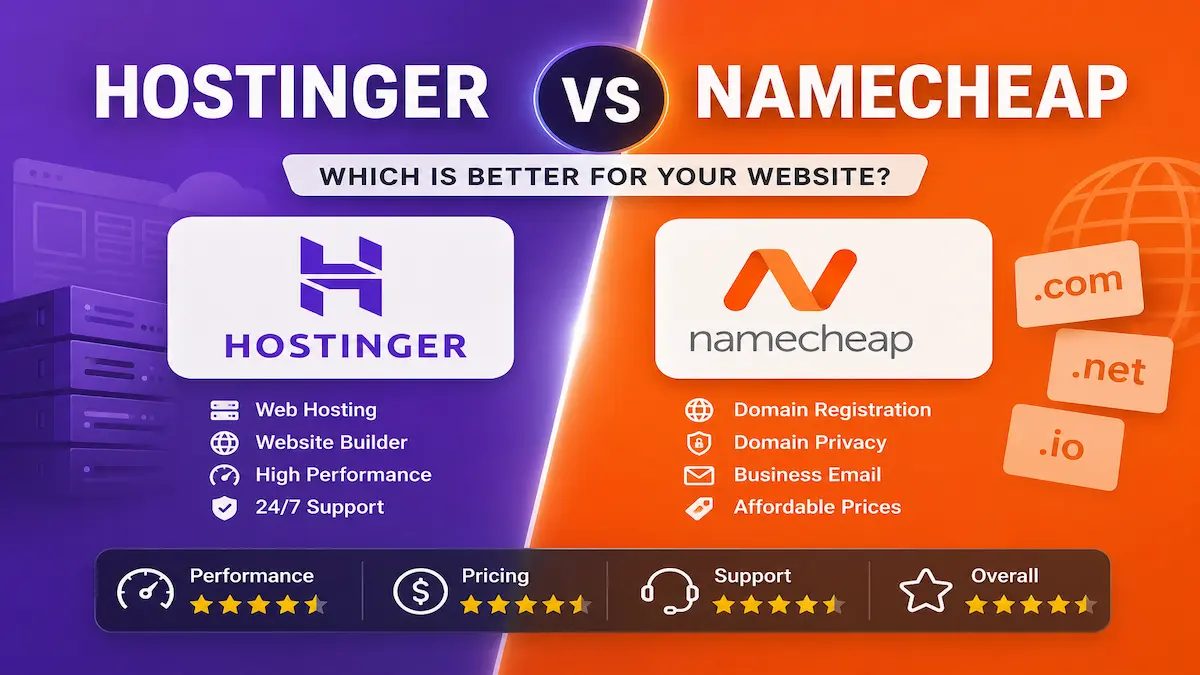
The honest answer: These two tools serve different primary purposes. Hostinger wins on hosting — faster speeds, better WordPress tools, more data centers. Namecheap wins on domains — cheapest .com prices, free WhoisGuard forever. The smartest move for most bloggers: buy your domain on Namecheap, host your site on Hostinger. Under $5/month combined.
Why Most Comparison Articles Get This Wrong
You have read five articles and you’re still stuck. Every one of them either picks a winner based on affiliate commission rates or refuses to commit to an answer at all. Neither approach helps you.
Here is the truth: Hostinger and Namecheap are not identical competitors fighting for the same user. They are fundamentally different tools that happen to offer overlapping services. Understanding that distinction is the fastest path to making the right choice.
I have used both at Tryamba for four years — Hostinger for hosting and Namecheap for domain registration on multiple projects. This comparison gives you the real verdict based on that actual experience, not a feature list comparison written by someone who has never logged into either dashboard.
What They Actually Are — Before We Compare Them
Hostinger, founded in 2004, is a hosting-first company. Everything they build — hPanel, their LiteSpeed infrastructure, their one-click WordPress setup — is designed to make hosting better. Think of it as a fully furnished apartment: you arrive, you move in, everything works.
Namecheap, founded in 2000, is a domain-first company. They added hosting later, but domains remain their core strength and competitive advantage. Think of Namecheap as the best real estate agent in the city — excellent at finding and managing addresses, also able to rent you a room, but that’s not their primary identity.
The key insight: When you compare their hosting products, you are comparing Hostinger’s main product against Namecheap’s secondary product. That context matters.
Master Comparison Table — 2026
| Feature | Hostinger | Namecheap | Winner |
|---|---|---|---|
| Starting Hosting Price | ~$2.99/mo | ~$1.58/mo | Namecheap |
| Renewal Price | ~$7.99/mo | ~$4.48/mo | Namecheap |
| Free Domain | ✅ Included (most plans) | ❌ Discount only | Hostinger |
| Free SSL | ✅ Lifetime | ⚠️ First year only | Hostinger |
| Web Server | LiteSpeed | Apache/LiteSpeed (varies) | Hostinger |
| Storage Type | NVMe SSD | Standard SSD | Hostinger |
| Data Centers | 12 locations globally | 4 locations | Hostinger |
| Uptime (Tested) | 99.9% — 100% | ~99.93% | Hostinger |
| Dashboard | hPanel (custom, modern) | cPanel (standard) | Tie (preference) |
| WordPress Tools | ✅ Staging, auto-updates | ⚠️ EasyWP (basic) | Hostinger |
| Domain Registration | Secondary feature | ✅ Core strength | Namecheap |
| .com Price (Annual) | ~$11.99/yr | ~$8.98/yr | Namecheap |
| Free WHOIS Privacy | ❌ | ✅ Free forever | Namecheap |
| 24/7 Support | ✅ Live chat (~2 min) | ✅ Live chat (decent) | Hostinger |
| Money-Back | 30 days | 30 days | Tie |
Round 1 — Pricing and True Long-Term Value
Namecheap looks cheaper upfront — $1.58/month on their Stellar plan versus Hostinger’s $2.99/month Premium. But this headline number hides three important costs that narrow the gap significantly.
What Namecheap’s price doesn’t include:
- Free domain: Not included (you pay separately or get a partial discount)
- SSL after year one: Approximately $9/year on top of hosting
- Renewal rates: Jump to approximately $4.48/month — still cheaper than Hostinger’s $7.99/month renewal, but the gap between intro and renewal price is similarly steep
What Hostinger’s price includes:
- Free domain for the first year on most plans
- Lifetime free SSL on all plans — no annual renewal cost
- LiteSpeed caching built in — no need for paid caching plugins
Once you add SSL costs and the domain registration gap, the real first-year cost difference between the two is smaller than the advertised price suggests. Over a three-year horizon, Namecheap’s lower renewal rate becomes a genuine advantage — but Hostinger delivers more included value in that first year.
For the full Hostinger pricing breakdown including renewal trap warnings, read my honest Hostinger review.
🏆 Round Winner: Tie — Namecheap is cheaper at renewal. Hostinger includes more in the first year. Choose based on your time horizon.
Round 2 — Speed and Performance
Speed affects Google rankings, bounce rates, and whether visitors stay long enough to click your affiliate links. It is not a vanity metric.
Independent testing across multiple sources in 2026 consistently shows Hostinger loading identical WordPress sites approximately twice as fast as Namecheap shared hosting. The technical reasons:
- LiteSpeed vs Apache: Hostinger uses LiteSpeed servers on all plans. Most Namecheap shared hosting runs Apache — a significantly older technology that processes concurrent requests less efficiently. The performance gap between LiteSpeed and Apache is measurable and consistent.
- NVMe vs Standard SSD: Hostinger uses NVMe SSD storage — approximately 5x faster read speeds than standard SSD. Namecheap uses standard SSD on most plans.
- 12 vs 4 data centers: Hostinger operates 12 data centers across the US, Europe, Asia, and South America. Namecheap has 4. Visitors connect to whichever server is closest — more locations means less latency for a globally distributed audience.
For a blogger targeting US audiences specifically, both perform acceptably. For anyone targeting global traffic or needing Google Core Web Vitals performance for SEO, Hostinger’s infrastructure advantage is real and measurable.
🏆 Round Winner: Hostinger
Round 3 — WordPress Hosting Specifically
If you are building an affiliate blog, WordPress is almost certainly your platform. This round matters most.
On Hostinger: WordPress installation through hPanel takes under two minutes. One click, automated SSL configuration, automatic updates, and built-in LiteSpeed caching with no plugin required. Higher-tier plans include a staging environment — you can test changes on a copy of your live site before pushing them, which eliminates the risk of breaking a live blog. Their AI-powered Kodee assistant handles routine maintenance tasks without requiring you to open the dashboard.
On Namecheap: WordPress hosting is available through their EasyWP platform, starting at $9.88/month — significantly more expensive than Hostinger for what you get. EasyWP is clean and functional but lacks staging environments, offers fewer optimization options, and has a lower performance ceiling. The standard shared hosting cPanel approach works for WordPress but requires more configuration to get performance equivalent to Hostinger’s out-of-the-box setup.
🏆 Round Winner: Hostinger
Round 4 — Dashboard and Ease of Use
Hostinger’s hPanel is the cleanest hosting dashboard I have used across four years and a dozen providers. Everything is organized by what you want to accomplish — not by technical category. Setting up a new WordPress blog, adding SSL, creating a professional email address: all take under five minutes each for a complete beginner. The interface has improved significantly with each update and remains genuinely beginner-friendly in 2026.
Namecheap’s cPanel is the industry standard — familiar to millions of experienced users and extremely powerful. For someone who already knows cPanel, there is real value in that familiarity. For a complete beginner encountering hosting for the first time, cPanel can feel overwhelming. Their EasyWP interface for WordPress-specific hosting is simpler, but trades control for simplicity in ways that can frustrate as your skills develop.
This round is partly a preference question — experienced users who prefer cPanel have a legitimate reason to choose Namecheap. For beginners and anyone who values simplicity over control, hPanel wins.
🏆 Round Winner: Hostinger (for beginners) | Tie for experienced users
Round 5 — Domain Registration
This is Namecheap’s home turf — and they win it clearly.
Namecheap offers .com registrations from approximately $8.98/year at renewal — one of the consistently lowest prices in the industry. More importantly, they include free WhoisGuard privacy protection forever. Most registrars charge $10-15/year to hide your personal information from public WHOIS records. Namecheap includes it free on every domain, for life. Their domain management dashboard is fast, clean, and easy to navigate even for first-time domain owners.
Hostinger sells domains, but it is secondary to their hosting business. Domain prices are slightly higher ($11.99/year for .com), and the domain management experience is not as polished as Namecheap’s.
The most common question: “Can I buy a domain on Namecheap and host on Hostinger?” Yes — and many bloggers do exactly this. You update the nameservers in your Namecheap dashboard to point to Hostinger’s servers. It takes five minutes and propagates within 24-48 hours. You get Namecheap’s superior domain pricing and WhoisGuard forever, combined with Hostinger’s superior hosting performance.
Get the current Namecheap promo code for discounted .com registration before you register your next domain.
🏆 Round Winner: Namecheap
Round 6 — Customer Support
Hostinger offers 24/7 live chat with response times consistently under 2-3 minutes in my experience. Their support agents handle both beginner and intermediate technical issues competently. They support 8+ languages including Bengali — relevant for Tryamba’s audience. The Kodee AI assistant now handles many routine support queries automatically and accurately, reducing the need to contact human support for common tasks.
Namecheap offers 24/7 live chat with response times typically under 1 minute for domain-related issues — this is their specialty and they are extremely competent at it. For complex hosting issues, the depth of support can be less consistent. Their knowledge base is extensive and well-organized.
🏆 Round Winner: Tie — Both are good. Namecheap responds faster initially. Hostinger is more thorough on hosting-specific issues.
Round 7 — Security
Hostinger includes a comprehensive security package on all plans: lifetime free SSL, weekly automated backups (daily on Business plan and above), malware scanning, web application firewall, and DDoS protection — all built in, no additional cost. For a beginner who does not want to think about piecing together a security setup, this out-of-the-box package eliminates a genuine concern.
Namecheap includes free SSL for the first year only, basic DDoS protection, and limited malware scanning on lower-tier plans. More advanced security features require plan upgrades. The gap in included security coverage is meaningful for anyone running a live blog where uptime and data protection matter.
🏆 Round Winner: Hostinger
Who Should Choose Hostinger?
- Beginner bloggers launching their first WordPress site who want everything working from day one
- Affiliate marketers who need fast page speeds for better Google rankings
- Content creators who plan to grow and need staging, multi-site support, and room to scale
- Anyone wanting an all-in-one deal — domain, SSL, and hosting bundled without hunting for add-ons
- First-time website owners who will need support and want fast, reliable 24/7 live chat
- Bloggers targeting global audiences who benefit from 12 data center locations
Free domain · Lifetime SSL · 30-day money-back · Verified May 2026
Who Should Choose Namecheap?
- Anyone registering a new domain who wants the lowest .com price with free permanent WhoisGuard
- Experienced users who prefer cPanel over Hostinger’s custom hPanel
- Bloggers who already have hosting elsewhere and only need domain registration
- Budget-conscious users running small, low-traffic sites where performance differences are less impactful
- Anyone who wants to combine Namecheap domain management with Hostinger hosting for the best of both
Free WhoisGuard forever · .com from $6.79 · No code needed · Auto-applied
The Smart Move — Why Many Bloggers Use Both
The most practical recommendation I give to new bloggers is this: register your domain on Namecheap, host your site on Hostinger.
You get Namecheap’s best-in-class domain pricing ($8.98/year .com) and free permanent WhoisGuard. You get Hostinger’s LiteSpeed hosting performance, beginner-friendly hPanel, lifetime SSL, and 12 global data centers. Combined cost: under $5/month for year one. This is the setup I’d use today if I were starting Tryamba from scratch.
The setup takes 5 minutes: buy domain on Namecheap → point nameservers to Hostinger → install WordPress through hPanel. Done.
If you want to explore a third option that combines strong performance with cPanel (like Namecheap) and LiteSpeed (like Hostinger), read my NameHero review — it is an interesting alternative for US-targeted sites.
📧 Get Weekly Hosting Deals Before They Expire
I send verified hosting discounts and promo codes to the Tryamba newsletter — including flash sales that last only 24-48 hours. Join free, unsubscribe any time.
Free on subscribe: SEO Checklist + AI Prompt Pack + Google Ranking Cheat Sheet
Frequently Asked Questions — Hostinger vs Namecheap 2026
Is Hostinger better than Namecheap for bloggers?
Yes, for hosting. Hostinger delivers faster speeds through LiteSpeed servers and NVMe storage, includes lifetime free SSL, offers a more beginner-friendly dashboard, and provides 12 global data centers versus Namecheap’s 4. For domain registration specifically, Namecheap offers lower prices and free permanent WhoisGuard privacy protection. Most bloggers are best served using Namecheap for domains and Hostinger for hosting.
Can I buy a domain on Namecheap and host on Hostinger?
Yes. This is a common and recommended setup. Register your domain on Namecheap at their lower price, then update the nameservers in your Namecheap domain dashboard to point to Hostinger’s servers. The process takes about five minutes and DNS propagates within 24-48 hours. You get Namecheap’s domain pricing advantage and Hostinger’s hosting performance advantage simultaneously.
Is Namecheap hosting reliable in 2026?
Yes, Namecheap hosting is reliable — tested uptime of approximately 99.93% and acceptable load times for low-to-medium traffic sites. The main limitation is that their hosting product is secondary to their domain business, and performance does not match Hostinger’s LiteSpeed infrastructure for speed-sensitive use cases like affiliate blogs targeting Google rankings.
Which has cheaper domains — Hostinger or Namecheap?
Namecheap is significantly cheaper for domain registration. A .com domain on Namecheap costs approximately $8.98 per year at renewal with free permanent WhoisGuard privacy included. Hostinger charges approximately $11.99 per year for .com domains. For domain registration, Namecheap wins clearly on both price and included features.
Does Namecheap include free SSL?
Namecheap includes a free SSL certificate for the first year only. After year one, you need to purchase an SSL certificate separately — typically $9-15 per year depending on the type. Hostinger includes free lifetime SSL on all hosting plans with no renewal cost. This is a meaningful long-term cost difference for bloggers who plan to stay on the platform for multiple years.
Which is better for beginners — Hostinger or Namecheap?
Hostinger is better for beginners who need hosting. The hPanel dashboard is more intuitive than Namecheap’s cPanel, WordPress setup takes under two minutes with one click, and SSL is pre-configured automatically. Namecheap’s cPanel is familiar to experienced users but can feel overwhelming for first-timers. Both have 24/7 live chat support.
Does Hostinger offer a money-back guarantee?
Yes. Hostinger offers a 30-day money-back guarantee on all hosting plans. If you are unsatisfied for any reason within 30 days of purchasing, you can request a full refund. Namecheap also offers a 30-day money-back guarantee on hosting plans. Both guarantees make the initial purchase essentially risk-free for evaluation purposes.
Final Verdict — Hostinger vs Namecheap 2026
After four years of using both tools across real projects at Tryamba, the verdict is clear and straightforward.
For hosting: Hostinger wins. Faster speeds, better WordPress tools, more data centers, lifetime SSL, and a more beginner-friendly dashboard. The additional cost over Namecheap is justified by what you get in return.
For domains: Namecheap wins. Lower .com prices, free permanent WhoisGuard, and the best domain management interface available at any price point.
The best setup for most bloggers: Use both. Register domains on Namecheap. Host on Hostinger. Get the best of both without compromise for under $5/month combined.
Free domain · Lifetime SSL · Verified May 2026
Free WhoisGuard forever · Auto-applied
Questions about choosing between the two for your specific situation? Drop them in the comments below — I answer personally based on four years of real use at Tryamba.

Dhrubo M — Founder, Tryamba.com
4+ years testing SEO & hosting tools
50+ tools reviewed | 100+ articles published
Verified Semrush Affiliate Partner
━━━━━━━━━━━━━━━━━━━━━━━━
I've been running for 4+ years covering SEO, web hosting, AI tools, and affiliate marketing. I personally test every tool I write about, including Hostinger, NameHero, Namecheap, Semrush, InVideo, and Fiverr. My goal is simple: give you honest, experience-backed advice that actually helps you grow online.
🔥 Top Recommendation
Semrush One
7-Day Free Trial
$0.00 Today · Full Access
✅ Cancel anytime before Day 7