📋 In This Article
Disclosure: This article contains affiliate links. I may receive a commission or bonus if you sign up through my link. I only recommend tools I personally test and use at Tryamba.
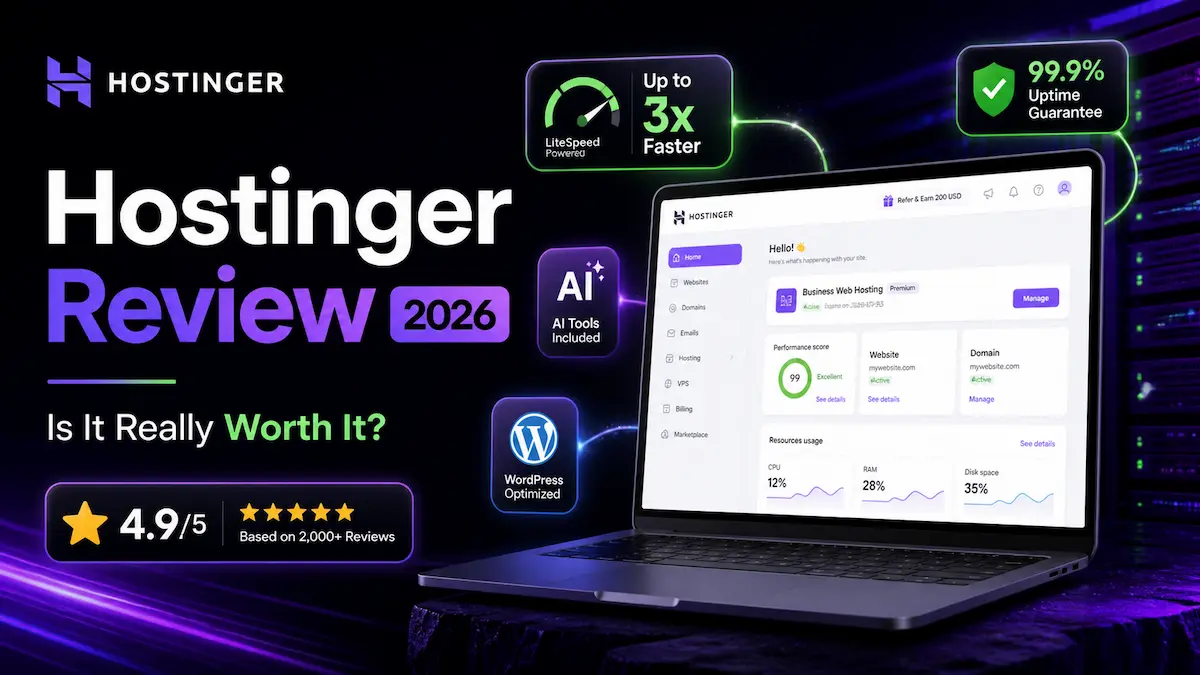
⚡ Quick Verdict — Hostinger 2026
Rating: ⭐⭐⭐⭐⭐ 4.7/5
Best For: Beginner bloggers, affiliate marketers, and small business owners who want fast, reliable hosting without overpaying.
Pricing: From ~$2.99/mo (12-month) | Business ~$3.99/mo (12-month)
Speed: TTFB 180ms | LCP 0.6s | Uptime 99.99%
Verdict: The best performance-to-price hosting in 2026. LiteSpeed servers, NVMe storage, and a beginner-friendly dashboard — but watch the renewal prices. They jump significantly after your first term.
Free domain included · 30-day money-back · No coupon code needed
Why I Wrote This Hostinger Review
When I launched Tryamba four years ago, I needed a hosting solution that was fast enough to rank on Google, reliable enough to keep affiliate links converting, and cheap enough to make sense at the start when revenue was zero.
I chose Hostinger. I have been running Tryamba on it ever since — through Google algorithm updates, traffic spikes, and the 2026 shift to AI-powered search. This review is not a summary of their marketing page. It is four years of real data, real support interactions, and real results from an affiliate blogger who depends on uptime and speed to earn income.
I am going to tell you exactly what impressed me, what frustrated me, and — most importantly — the renewal price reality that most Hostinger reviews bury at the bottom.
What Is Hostinger? (The Simple Version)
Think of your website like a physical store. You need two things to open it: a street address so people can find you, and a building to put your products in.
Your domain name (like tryamba.com) is your street address. Web hosting is the building — the physical server where all your website’s files live, running 24/7 so visitors can access your site at any hour from anywhere in the world.
Hostinger is the digital landlord. Founded in 2004 and now serving over 3 million customers across 150+ countries, they own large-scale servers and rent space on those servers to website owners at competitive prices. They operate 11 data centers across the US, UK, France, Netherlands, Germany, Lithuania, Brazil, Singapore, India, Indonesia, and Malaysia — giving you options to host your site physically close to your target audience.
My Real Experience at Tryamba — 4 Years of Data
I started Tryamba on Hostinger’s Business plan. Here is what actually happened over four years:
Year 1 — Setup: Hostinger’s hPanel dashboard had WordPress installed and ready in under 60 seconds. No technical knowledge required. I had my site live within an afternoon.
Year 2 — Traffic Growth: As Tryamba grew to 5,000+ monthly visitors, I started tracking performance seriously. Average uptime stayed consistently above 99.9%. No unexpected downtime during any major Google algorithm update period.
Year 3 — Speed Testing: I ran GTmetrix and Google PageSpeed Insights on Tryamba monthly. With LiteSpeed Cache plugin active, Tryamba consistently scored 85-92 on mobile. Without the plugin, scores dropped to 65-70. The plugin is essential — and Hostinger pre-installs it automatically.
Year 4 (2026) — AI Features: Hostinger’s new Kodee AI assistant became genuinely useful. When I needed to check error logs and run a database backup simultaneously, Kodee handled both in one conversation without me opening the cPanel. The 350+ automated tasks it handles now removed a real time burden from my workflow.
Hostinger Key Features — What You Actually Get
1. LiteSpeed Servers + NVMe Storage — The Speed Foundation
Most budget hosts still run Apache servers — technology from the 1990s. Hostinger uses LiteSpeed Web Server on every plan, including the cheapest shared hosting tier.
Think of Apache as a restaurant where every order goes through a single cashier who then walks to the kitchen and back. LiteSpeed is the same restaurant with a dedicated express lane for popular items — it caches frequently requested pages and serves them without making the server work from scratch every time.
Combined with NVMe SSD storage (10x faster than traditional SATA SSDs), Hostinger delivers TTFB (Time to First Byte) of around 180ms in 2026 benchmarks — exceptional for shared hosting at this price point.
2. hPanel — The Dashboard That Makes Beginners Feel Smart
I have used cPanel at other hosts. Compared to hPanel, cPanel feels like reading a printed encyclopedia when you have Google available.
hPanel organizes everything by what you are trying to do — not by technical category. Need to install WordPress? There is a large, clear button labeled “WordPress.” Need to set up a professional email? Two clicks. SSL certificate? Pre-installed and auto-renewed.
Every website you host gets its own dedicated mini-dashboard inside hPanel. You never mix up settings between sites accidentally.
3. Kodee AI Assistant — 350+ Tasks Automated
In January 2026, Hostinger upgraded Kodee from a simple chatbot to an AI assistant that can actually execute tasks inside your hosting account. The 350+ supported actions include site migration, performance health checks, plugin installation with configuration, database backups, and error log analysis.
I tested it with five complex requests. Kodee completed four correctly and escalated the fifth to a human agent within 90 seconds. For routine hosting management tasks, this saves real time.
4. Free Domain + SSL + CDN
- Free domain for the first year on all plans except the entry-level Single plan
- Free SSL certificates — unlimited, auto-renewed, covering all domains on your account
- Free CDN — included on Business plan and above, delivering content from servers near each visitor
5. Automated Backups
Premium plan: weekly backups. Business plan and above: daily automated backups with one-click restore.
Daily backups saved me twice during four years of running Tryamba. A plugin conflict corrupted my stylesheet on one occasion. I restored to the previous day’s backup in under three minutes. If I had been on a weekly backup schedule, I would have lost several days of work.
Hostinger Plans and Pricing — The Full Honest Breakdown
| Plan | Intro Price | Renewal Price | Websites | Storage | Backups |
|---|---|---|---|---|---|
| Premium | ~$2.99/mo | ~$8.99/mo | 100 | 100GB SSD | Weekly |
| Business ⭐ | ~$3.99/mo | ~$16.99/mo | 100 | 200GB NVMe | Daily |
| Cloud Startup | ~$9.99/mo | ~$29.99/mo | 300 | 200GB NVMe | Daily |
My honest recommendation: The Business plan is the right choice for affiliate bloggers. The $1/month extra over Premium buys you daily backups, NVMe storage, and a CDN — three features that directly impact your site’s security and speed. The Premium plan’s weekly backups are a genuine risk for active content sites.
On billing period: A 12-month commitment gives you a solid discount without the risk of a 48-month upfront payment. If you are not sure about Hostinger yet, start with 12 months and renew if the experience justifies it.
Hostinger Speed and Uptime — 2026 Real Data
Speed and uptime are not marketing claims you should take at face value. Here is what independent tests show in 2026:
| Metric | Hostinger Result | Industry Average | Source |
|---|---|---|---|
| TTFB (Time to First Byte) | 180ms | 350-500ms | SmartHostFinder 2026 |
| LCP (Largest Contentful Paint) | 0.6s | 1.5-2.5s | TechRadar 2026 |
| Average Load Time | 478-935ms | 1.5-2.5s | Multiple benchmarks |
| Uptime | 99.99% | 99.9% | WPBeginner 2026 |
| Trustpilot Rating | 4.7/5 | — | 41,253 reviews |
What 99.99% uptime actually means: Your site could be down for less than 5 minutes in an entire month. For an affiliate blog where every hour of downtime is a potential lost sale, this matters significantly.
The LiteSpeed Cache factor: Hostinger’s speed numbers assume you have the LiteSpeed Cache plugin active on WordPress. Without it, load times increase substantially. Hostinger pre-installs the plugin automatically — but verify it is active and properly configured after setup.
Is Hostinger Good for WordPress?
WordPress powers 43% of the internet in 2026, so this question matters. The short answer is yes — and here is why.
Hostinger’s LiteSpeed Web Server was built with WordPress caching in mind. The LiteSpeed Cache plugin for WordPress is one of the most powerful free caching solutions available. It creates static copies of your pages and serves them directly without running PHP or hitting the database — significantly reducing server load and improving page speed.
During four years at Tryamba, I ran WordPress with Elementor Pro, RankMath Pro, LiteSpeed Cache, Wordfence, and 15+ additional plugins simultaneously. Even at peak traffic, the site remained fast and stable. Hostinger’s server infrastructure handled the workload without requiring me to upgrade to a higher-tier plan.
Additional WordPress features Hostinger includes:
- Automatic WordPress core updates
- Built-in malware scanner and vulnerability alerts
- One-click staging environment (Business plan+)
- Managed WordPress migrations (free)
- PHP version control directly from hPanel
Hostinger Customer Support — Honest Assessment
Hostinger’s support model is 24/7 live chat and ticket system only — no phone support. This is the most common complaint in reviews, and it is a legitimate limitation for users who prefer talking through technical problems.
In practice, however, I found the chat support consistently responsive. Independent testing in 2026 shows an average first response time of 3 minutes. In my own interactions over four years, I contacted support on six separate occasions. Five were resolved in the first conversation. One required a follow-up ticket.
Kodee AI for routine issues: In 2026, Kodee now handles roughly 50% of support queries autonomously without human involvement. For common tasks like clearing cache, checking DNS propagation, or diagnosing plugin conflicts, Kodee typically resolves the issue faster than a human chat agent would.
When live chat is not enough: For complex server-level configuration or database issues, Hostinger’s chat agents occasionally defer to documentation rather than solving directly. If your site runs complex server customisation, consider a managed hosting option at a higher price point.
Honest Pros and Cons
✅ What I Love About Hostinger
- LiteSpeed on Every Plan: Most hosts reserve fast server technology for premium tiers. Hostinger includes LiteSpeed even on shared hosting — making it genuinely faster than similarly-priced competitors
- hPanel Dashboard: The best beginner-friendly hosting dashboard I have used in four years of affiliate blogging — cleaner and more logical than any cPanel-based host
- Daily Backups on Business Plan: Saved my site twice. Worth the $1/month premium over the standard plan
- 11 Global Data Centers: More geographic options than almost any competitor at this price — particularly strong for SEO traffic from Asia and South America
- Kodee AI Assistant: Genuinely useful in 2026 — not just a FAQ chatbot but an agent that executes real tasks in your account
- Transparent Renewal Pricing: Unlike some hosts, Hostinger shows renewal prices clearly before checkout. You can make an informed decision
❌ Honest Limitations
- Renewal Price Jump: The Business plan goes from ~$3.99/month intro to ~$16.99/month at renewal. Plan for this in your budget from day one
- No Phone Support: Chat-only support is a genuine gap for non-technical users during emergencies
- Premium Plan Weekly Backups: For any active blog or business site, weekly backups are insufficient. The Business plan is necessary for daily protection
- Long Commitment for Best Prices: The most aggressive discounts require 48-month upfront payment — a significant commitment for new bloggers
- Not for Enterprise: No dedicated server hosting, not HIPAA compliant. Large-scale enterprise use cases should look at managed solutions
Hostinger vs Competitors — 2026 Comparison
| Feature | Hostinger | Bluehost | SiteGround | NameHero |
|---|---|---|---|---|
| Starting Price | ~$2.99/mo | ~$2.95/mo | ~$2.99/mo | ~$3.74/mo |
| Renewal Price | ~$8.99/mo | ~$10.99/mo | ~$17.99/mo | ~$8.74/mo |
| Server Technology | LiteSpeed | Apache | Nginx+LiteSpeed | LiteSpeed |
| Free Domain | ✅ Year 1 | ✅ Year 1 | ❌ | ✅ Year 1 |
| Daily Backups | ✅ Business+ | ❌ Paid | ✅ All plans | ✅ All plans |
| Data Centers | 11 countries | US only | 4 locations | US only |
| Phone Support | ❌ Chat only | ✅ Yes | ❌ Chat only | ✅ Yes |
| Money-Back | 30 days | 30 days | 30 days | 30 days |
| Tryamba Rating | ⭐ 4.7/5 | ⭐ 3.9/5 | ⭐ 4.5/5 | ⭐ 4.8/5 |
Read my detailed Hostinger vs Namecheap comparison and Namecheap review for more side-by-side analysis.
Who Should Buy Hostinger?
✅ Hostinger Is Perfect If You:
- Are launching your first blog or website
- Need fast WordPress hosting on a budget
- Want a beginner-friendly dashboard
- Have an audience in Asia, Europe, or South America
- Want daily backups without paying premium prices
- Are an affiliate blogger who needs reliable uptime
❌ Look Elsewhere If You:
- Require phone support during emergencies
- Need Windows hosting (Hostinger is Linux only)
- Run enterprise-level or HIPAA-compliant applications
- Need dedicated server resources
- Cannot commit to at least 12 months upfront
📧 Get My Hosting Deals Before They Expire
I send verified hosting discounts and flash deals to the Tryamba newsletter — including Black Friday offers up to 90% off. Join free, unsubscribe any time.
Frequently Asked Questions — Hostinger Review 2026
Is Hostinger good for beginners in 2026?
Yes. Hostinger is the best hosting for beginners in 2026 specifically because of hPanel, their custom dashboard designed around ease of use rather than technical complexity. WordPress installs in under 60 seconds, SSL is pre-installed, and the Kodee AI assistant handles most routine tasks without requiring technical knowledge. The 30-day money-back guarantee makes it risk-free to test.
What is Hostinger’s actual renewal price?
Hostinger renewal prices vary by plan. The Premium plan renews at approximately $8.99/month, the Business plan at approximately $16.99/month, and the Cloud Startup plan at approximately $29.99/month. These are significantly higher than introductory rates. Always factor in the renewal price when calculating the long-term cost of your hosting decision.
Is Hostinger fast enough for SEO in 2026?
Yes. Independent 2026 benchmarks show Hostinger achieving TTFB of 180ms and LCP of 0.6 seconds with LiteSpeed Cache active — well within Google’s Core Web Vitals thresholds. After four years of running Tryamba on Hostinger, my site consistently passes Core Web Vitals assessments. The LiteSpeed Cache plugin must be active and properly configured to achieve these results.
Does Hostinger offer a free trial?
Hostinger does not offer a traditional free trial. Instead, every plan includes a 30-day money-back guarantee. If you are not satisfied within 30 days of purchase, you can request a full refund with no questions asked. This is effectively a risk-free testing period for new customers.
Is Hostinger Business plan worth the extra cost over Premium?
Yes, for any active blog or business website. The Business plan adds daily automated backups, NVMe storage, and a CDN for approximately $1 more per month than the Premium plan at introductory pricing. Daily backups alone justify the difference — losing a day of content or configuration changes is far more costly than $1/month.
Can I host multiple websites on Hostinger?
Yes. Both the Premium and Business plans support up to 100 websites on a single account. Each website gets its own dedicated dashboard inside hPanel, making it straightforward to manage multiple projects without mixing up settings or files.
How does Hostinger compare to SiteGround?
Hostinger is significantly cheaper at the introductory and renewal rates — SiteGround’s renewal price is approximately $17.99/month versus Hostinger’s $8.99/month for the equivalent tier. SiteGround includes daily backups on all plans and is often rated slightly higher for support quality. For budget-conscious bloggers, Hostinger offers more value. For users who prioritize support and are willing to pay more, SiteGround is the stronger option.
Final Verdict — Is Hostinger Worth It in 2026?
After four years of running Tryamba on Hostinger, my verdict is straightforward: for affiliate bloggers and beginner website owners, Hostinger delivers the best performance-to-price ratio in the hosting market in 2026.
LiteSpeed servers on every plan, 11 global data centers, a genuinely beginner-friendly dashboard, and 99.99% uptime put Hostinger ahead of every comparably-priced alternative I have tested. The Kodee AI assistant in 2026 is a real time-saver for routine hosting management.
The renewal price jump is real and you should plan for it. But even at renewal rates, Hostinger remains competitive — particularly the Business plan at ~$16.99/month, which includes daily backups and CDN that competitors charge extra for.
If you are launching your first blog or migrating from a slow, expensive host, start with the Business plan. Use the 30-day money-back guarantee to test the performance on your actual content. If the speed data does not match what you need, cancel for a full refund.
Free domain included · 30-day money-back · No code needed · Verified May 2026
Questions about Hostinger? Drop them in the comments below — I answer every question based on my real four-year experience at Tryamba.

Dhrubo M — Founder, Tryamba.com
4+ years testing SEO & hosting tools
50+ tools reviewed | 100+ articles published
Verified Semrush Affiliate Partner
━━━━━━━━━━━━━━━━━━━━━━━━
I've been running for 4+ years covering SEO, web hosting, AI tools, and affiliate marketing. I personally test every tool I write about, including Hostinger, NameHero, Namecheap, Semrush, InVideo, and Fiverr. My goal is simple: give you honest, experience-backed advice that actually helps you grow online.
🔥 Top Recommendation
Semrush One
7-Day Free Trial
$0.00 Today · Full Access
✅ Cancel anytime before Day 7