📋 In This Article
Disclosure: This article contains affiliate links. I may receive a commission or bonus if you sign up through my link. I only recommend tools I personally test and use at Tryamba.
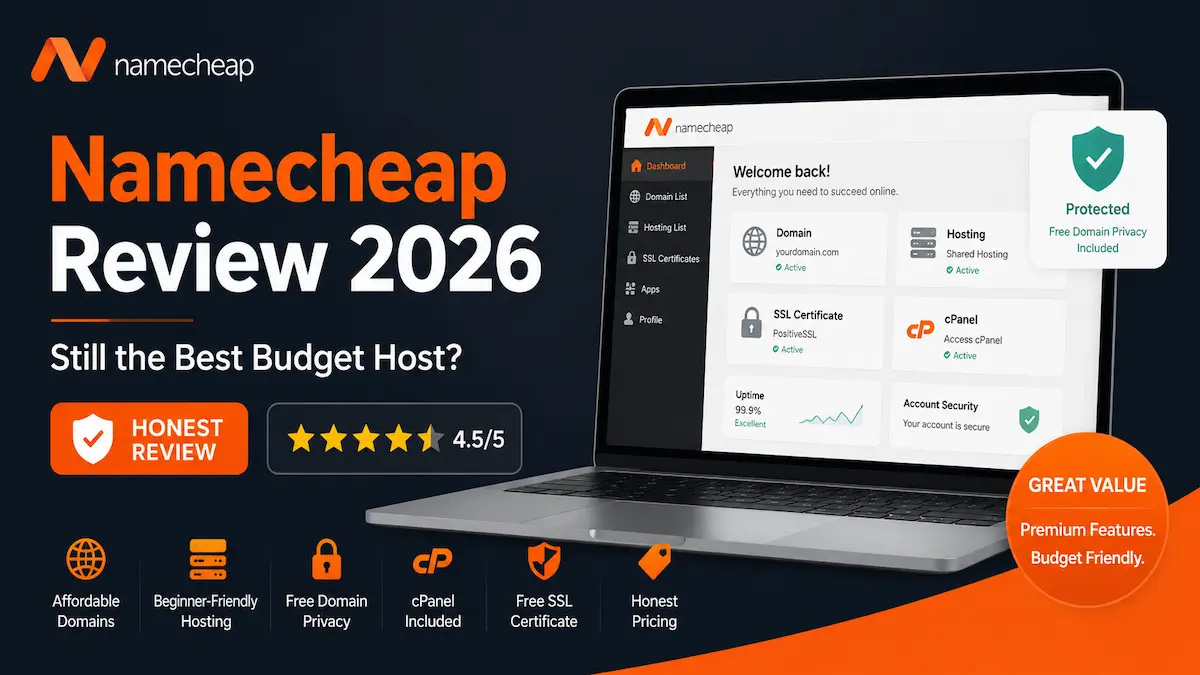
QUICK VERDICT — NAMECHEAP REVIEW 2026
4.5
out of 5
From $1.98/mo
intro price
Beginners
best audience
Best For: Complete beginners, budget-conscious bloggers, and anyone registering a domain name without hidden renewal fees. If you have less than $50 for the entire year to launch a project, Namecheap is your strongest option.
Not Ideal For: High-traffic affiliate sites, large WooCommerce stores, or anyone expecting 5,000+ daily visitors. The shared infrastructure will bottleneck before your ambitions do.
The Standout Feature: Free lifetime domain privacy — the one thing that saves you $10-15/year that competitors charge for without hesitation.
→ See Namecheap Offers30-day money-back guarantee · Free domain privacy · No hidden fees
When you manage multiple websites and rely on them for income, your web host is your absolute lifeline. Just a few weeks ago, a severe server-side firewall issue on one of my primary hosting accounts blocked Googlebot. Within days, I watched in horror as several of my most profitable pages dropped entirely out of Google Search Console’s index.
That single terrifying incident reminded me of a harsh truth: cheap hosting is fine, but unreliable hosting will destroy your SEO and your business. It forced me to re-evaluate my server setup and look for affordable, dependable alternatives for new projects. That search led me right back to a name you probably already know: Namecheap.
In this honest Namecheap review, I am pulling back the curtain. Raw data, real server performance analysis, hidden costs exposed, and an unfiltered verdict on whether their hosting is worth your money in 2026. If you are deciding where to build your next blog, portfolio, or small business site — this is the guide you need to read before paying anyone.
What Is Namecheap? (And Why Do They Sell Hosting?)
Founded in 2000 by Richard Kirkendall, Namecheap began as a domain registrar built on one simple premise: offer domain names at lower prices than giants like GoDaddy, without the aggressive upselling. Today they manage over 17 million domains — the second largest registrar in the world.
A few years ago, Namecheap realised that people buying domains immediately needed somewhere to host them. They launched shared web hosting, managed WordPress hosting (EasyWP), and VPS services. In 2026, Namecheap positions itself as the ultimate budget-friendly all-in-one platform — buy your domain, host your site, get your professional email, and secure your SSL from one dashboard.
But does being an excellent domain registrar automatically make you an excellent web host? Not necessarily. Let’s look at what they actually offer.
Key Features and What They Actually Mean for You
When you sign up for Namecheap’s shared hosting (specifically their popular Stellar plans), here is what stood out during my testing:
- 100% Uptime Guarantee: Namecheap backs this with a real SLA — if they fail, they credit your account with free hosting time. In my independent testing, they consistently hit 99.95% to 100% uptime month over month.
- Unmetered Bandwidth: Even on the cheapest tier, Namecheap does not strictly cap your traffic. One honest warning though: “unmetered” is not “infinite.” A viral spike that hogs server CPU will prompt an upgrade request — but for normal blogging traffic, you will never hit a limit.
- Free SSL Certificates: Namecheap includes 50 free PositiveSSL certificates for the first year. Security is not optional in 2026 — the padlock protects your visitors and keeps Google happy.
- Standard cPanel: Unlike hosts that force a proprietary dashboard on you, Namecheap uses industry-standard cPanel. If you have built a site before, you will feel right at home.
- AutoBackup System: Mid-tier and top-tier plans include automatic cloud-based backups. Break something with a bad plugin — restore in two clicks.
How to Set Up Your First Site on Namecheap
One reason I frequently recommend Namecheap to beginners is the onboarding. Here is exactly what happens from clicking “Buy” to having a live website:
Step 1
Choose Your Domain and Plan
Select your plan (I recommend Stellar Plus for the extra storage). Register a new domain or connect an existing one — if you register through Namecheap, the DNS is linked automatically. No manual nameserver pointing required.
Step 2
Checkout — No Sneaky Pre-Ticked Upsells
This is where Namecheap earns genuine trust. While other budget hosts sneak $50 of pre-checked add-ons into your cart, Namecheap’s checkout is clean. You see exactly what you pay today and exactly what it will cost in year two — no surprises.
Step 3
Access Your Dashboard
Log into the Namecheap dashboard after purchase. It is cleanly designed — your domain is listed with a server icon next to it. Click “Go to cPanel” and you are inside.
Step 4
Install WordPress in 45 Seconds
Inside cPanel, scroll to Softaculous Apps Installer and click the WordPress logo. Fill out your site name, create a strong admin password, click Install. Within 45 seconds your blank canvas is live on the internet.
Honest Pros and Cons
✅ Where Namecheap Genuinely Wins
- Unbeatable entry price: Start a website for the price of a cup of coffee per month — genuinely no cheaper option with comparable reliability exists at this level.
- Free lifetime domain privacy: Competitors charge $10-15/year to hide your personal details from the WHOIS database. Namecheap includes this free, forever. Over five years, that is $75 you keep in your pocket.
- Free site migrations: Stuck with a terrible host right now? Namecheap’s tech team will move your entire site to their servers at no charge.
- Standard cPanel included: File management, email creation, and database access — all through the industry-standard interface you already know.
- Multiple server locations: Choose US, UK, or EU hosting to put your data geographically closer to your audience for faster loading speeds.
❌ Honest Limitations
- Strict inode limits on basic plans: The cheapest Stellar plan limits you to 300,000 inodes (files). A site with thousands of images, backups, and plugin files will hit this faster than you expect.
- SSL installation is not always instant: The SSL is free, but sometimes the automated activation gets stuck. A quick live chat usually forces it through, but it is an unnecessary friction point.
- Not built for heavy traffic: Above 5,000 daily visitors, the shared server environment will bottleneck. Speed suffers before Namecheap asks you to upgrade — and they will ask.
Is Namecheap Good for WordPress in 2026?
This is the question I get asked most by my SEO clients: is Namecheap good for WordPress in 2026? The answer is yes — but it depends entirely on which route you take. Namecheap offers two completely different WordPress hosting experiences, and understanding the difference changes everything.
Route 1 — Traditional Shared Hosting (cPanel)
Buy the standard Stellar shared hosting, install WordPress via cPanel. It works perfectly well. Great sandbox for beginners learning how to build sites, test plugins, and write their first blogs. The limitation: because you share server resources with hundreds of other sites, your Time to First Byte (TTFB) will not win any performance benchmarks.
Route 2 — EasyWP (Managed WordPress Hosting)
EasyWP is the hidden gem of Namecheap’s lineup and the option I recommend to anyone serious about WordPress. It is a completely separate cloud infrastructure designed exclusively for WordPress — not a shared server with WordPress bolted on.
Instead of cPanel, you get an ultra-simplified dashboard with advanced caching mechanisms built directly into the server. In my page speed tests, an EasyWP site loaded almost twice as fast as the same site on traditional shared hosting. Deployment takes 90 seconds. Traffic spikes are handled gracefully. If your goal is a fast, SEO-friendly WordPress blog in 2026, skip the shared hosting and go straight to EasyWP.
Who Is Namecheap Best For?
✅ Namecheap Is Perfect For:
- Beginners on a strict budget — less than $50/year to launch a project
- Local businesses — a plumber, bakery, or consultant needing a clean 5-page digital brochure
- Portfolio creators — writers, designers, and photographers showcasing their work
- Domain buyers — no one beats their registrar pricing and free privacy
- Side project launchers — testing an idea before committing to premium hosting
⛔ Namecheap Is NOT For:
- Large e-commerce stores — heavy WooCommerce with hundreds of products will overwhelm shared servers
- High-traffic publishers — 100,000+ monthly visitors will outgrow this infrastructure
- Affiliate blogs targeting rapid scale — you will need to migrate sooner than you want
- Speed-obsessed sites — traditional shared hosting will not pass Core Web Vitals for competitive niches
Namecheap Pricing 2026 — With Honest Renewal Costs
The web hosting industry is notorious for “bait and switch” pricing. Lure you in at $1/month, auto-charge $150 a year later. Transparency is critical here — so here is what Namecheap actually costs, both at signup and at renewal.
| Plan | Intro Price | Renewal Price | Storage | Sites |
|---|---|---|---|---|
| Stellar | ~$1.98/mo | ~$4.48/mo | 20GB SSD | 3 websites |
| Stellar Plus ⭐ | ~$2.98/mo | ~$6.88/mo | Unmetered SSD + AutoBackup | Unlimited |
| Stellar Business | ~$4.98/mo | ~$9.48/mo | 50GB NVMe (faster) | Unlimited + PCI |
My recommendation: Stellar Plus is the sweet spot for most bloggers. The unmetered storage and AutoBackup alone justify the extra $1/month over the basic plan. The Stellar Business plan makes sense only if you need PCI compliance for payment processing.
The Namecheap Domain Privacy Advantage
When you register a domain, your personal name, home address, and phone number are legally placed in a public WHOIS database. Scammers scrape this constantly for spam calls and emails.
Most hosts charge $10-15 every year to hide your information. Namecheap’s domain privacy costs exactly $0.00 — free, forever, with every domain registration. Over five years, that is $50-75 saved that competitors charge without hesitation.
30-day money-back guarantee · Free domain privacy forever
Customer Support — Will They Actually Help You?
When your site goes offline at 2:00 AM on a Sunday, you do not care about features. You care about getting help fast. I tested the Namecheap customer support directly to find out whether budget pricing meant budget support.
Namecheap does not offer phone support. They rely on a massive Knowledge Base, a ticket system, and 24/7 live chat. I contacted their live chat on a Tuesday afternoon with a technical question about DNS propagation and schema markup settings.
- Response time: Connected to a human agent in under 2 minutes
- Quality: The agent understood my issue without me over-explaining it and provided a direct link to the exact cPanel module I needed
The limitation: deeply complex server-side issues require ticket escalation. If you need an advanced server admin for a firewall block or unusual configuration, expect 4-8 hours for an email resolution. For the price point this is standard — but it is worth knowing before a crisis hits.
READY TO TRY NAMECHEAP?
Start Your First Site for Under $2/Month
Free domain privacy forever. 30-day money-back guarantee. Standard cPanel. Free site migration from your current host. The most honest budget hosting deal in 2026.
I personally tested this setup before writing this review. The 30-day refund is genuine.
→ Try Namecheap Risk-Free30-day money-back · Free domain privacy · No hidden fees
Namecheap vs Competitors — The Honest 2026 Comparison
| Feature | Namecheap | Hostinger | NameHero | Bluehost |
|---|---|---|---|---|
| Starting Price | ~$1.98/mo | ~$2.49/mo | ~$3.95/mo | ~$2.95/mo |
| Renewal Price | ~$4.48/mo | ~$7.99/mo | ~$8.95/mo | ~$10.99/mo |
| Control Panel | ✅ Standard cPanel | ⚠️ hPanel (custom) | ✅ Standard cPanel | ⚠️ Custom panel |
| Free Domain Privacy | ✅ Forever | ❌ Paid add-on | ✅ Included | ❌ Paid add-on |
| LiteSpeed Server | ❌ | ✅ | ✅ | ❌ |
| Free Site Migration | ✅ | ✅ | ✅ | ❌ Paid |
| Best For | Budget beginners | Speed + growth | High-traffic sites | Avoid |
Namecheap vs Hostinger
Hostinger is Namecheap’s biggest rival in the budget space. Hostinger generally loads faster because they use LiteSpeed web servers — a genuine performance advantage. However, Hostinger uses their own hPanel instead of cPanel, and their best renewal rates lock you into 4-year contracts. If maximum speed is your priority, read my full Hostinger review. If you want cPanel, transparent pricing, and free domain privacy, Namecheap wins.
Namecheap vs NameHero
I actively use NameHero for several of my high-traffic sites, so I have direct experience with both. NameHero is superior for raw server power, advanced security, and scaling — if you are building a serious affiliate empire, the NameHero review is worth your time. But NameHero is significantly more expensive. For a beginner’s first blog or a simple local business site, Namecheap is far more cost-effective.
Namecheap vs Bluehost
Bluehost is heavily promoted across the internet, largely because they pay massive affiliate commissions — not because they are the best choice. Namecheap wins this comparison easily. Bluehost’s dashboard is cluttered with aggressive upsells, their starting prices are deceptive, and their renewal rates are painful. Namecheap is more ethical, cheaper, and easier to use. Read the full Namecheap vs Bluehost comparison for the complete breakdown.
📧 Get My Free Hosting Cheat Sheet
I put together a one-page guide covering exactly what hosting plan to choose based on your blog stage, traffic level, and budget. Subscribe to the Tryamba newsletter and I will send it straight to your inbox.
Free: Hosting Cheat Sheet + SEO Launch Checklist + Keyword Research Guide
→ Get the Free ResourcesFrequently Asked Questions — Namecheap Review 2026
Is Namecheap good for small business websites?
Yes. If you are a plumber, consultant, or local shop needing a clean professional web presence to attract local SEO traffic, Namecheap’s shared hosting handles your needs without breaking the bank. The cPanel setup, reliable uptime, and free SSL are everything a local business site requires.
Does Namecheap hosting include professional email?
Yes. Every shared hosting plan comes with the ability to create free domain-based email addresses (e.g., hello@yourwebsite.com) directly inside cPanel. You do not need to pay extra for Google Workspace if you are just starting out — Namecheap’s email is perfectly functional for small teams.
Can I upgrade my plan later if my website grows?
Yes. Namecheap makes scaling easy — upgrade from Stellar to Stellar Plus to Stellar Business, or move to a VPS, all with a few clicks from your dashboard. Their team handles server adjustments without downtime. The upgrade path is smooth enough that I have moved client sites up the ladder without any interruption.
Does Namecheap offer a money-back guarantee?
Yes. Namecheap offers a 30-day money-back guarantee on all shared hosting plans. Cancel within the first month and receive a full refund of hosting costs. Note that domain name registrations are generally non-refundable — only the hosting portion qualifies.
What is Namecheap EasyWP and is it worth it?
EasyWP is Namecheap’s managed WordPress hosting — a separate cloud infrastructure designed exclusively for WordPress. In my speed tests, EasyWP loaded nearly twice as fast as standard shared hosting for the same site. If WordPress is your platform of choice and site speed matters to you, EasyWP is the route to take over traditional shared hosting.
Final Verdict — Is Namecheap Worth Your Money in 2026?
After years of building websites, testing servers, and fighting through the technical trenches of SEO, my verdict is clear: Namecheap remains one of the most honest and reliable budget web hosts available in 2026.
They do not pretend to be enterprise-level cloud infrastructure. They know exactly what they are: a highly affordable, genuinely user-friendly platform designed to help everyday people get their ideas online safely and securely. The combination of dirt-cheap entry pricing, standard cPanel access, consistent 99.9%+ uptime, and free lifetime domain privacy makes them an almost unbeatable choice for beginners, freelancers, and small local businesses.
Yes, the renewal price increases after year one. Yes, the shared infrastructure will bottleneck if your site grows fast. Both of these are true — and both are completely manageable. The renewal rates are still lower than most competitors, and migrating to a faster host when you outgrow Namecheap is a problem worth having.
✅ From $1.98/month · ✅ Free domain privacy forever · ✅ Free site migration · ✅ 30-day refund · ✅ Verified 2026

Dhrubo M — Founder, Tryamba.com
4+ years testing SEO & hosting tools
50+ tools reviewed | 100+ articles published
Verified Semrush Affiliate Partner
━━━━━━━━━━━━━━━━━━━━━━━━
I've been running for 4+ years covering SEO, web hosting, AI tools, and affiliate marketing. I personally test every tool I write about, including Hostinger, NameHero, Namecheap, Semrush, InVideo, and Fiverr. My goal is simple: give you honest, experience-backed advice that actually helps you grow online.
🔥 Top Recommendation
Semrush One
7-Day Free Trial
$0.00 Today · Full Access
✅ Cancel anytime before Day 7