You’ve read five articles, opened ten tabs, and you’re still stuck. Hostinger or Namecheap — which one do you actually buy?
I get it. Most comparison articles just rewrite the same specs without ever giving you a real answer.
I’ve personally used and reviewed both on Tryamba — and in this Hostinger vs Namecheap breakdown, I’m giving you a clear, honest verdict. No ties, no fence-sitting. Just what I’d tell a friend who asked me over coffee.
Let’s settle this once and for all.
Quick Verdict (TL;DR)
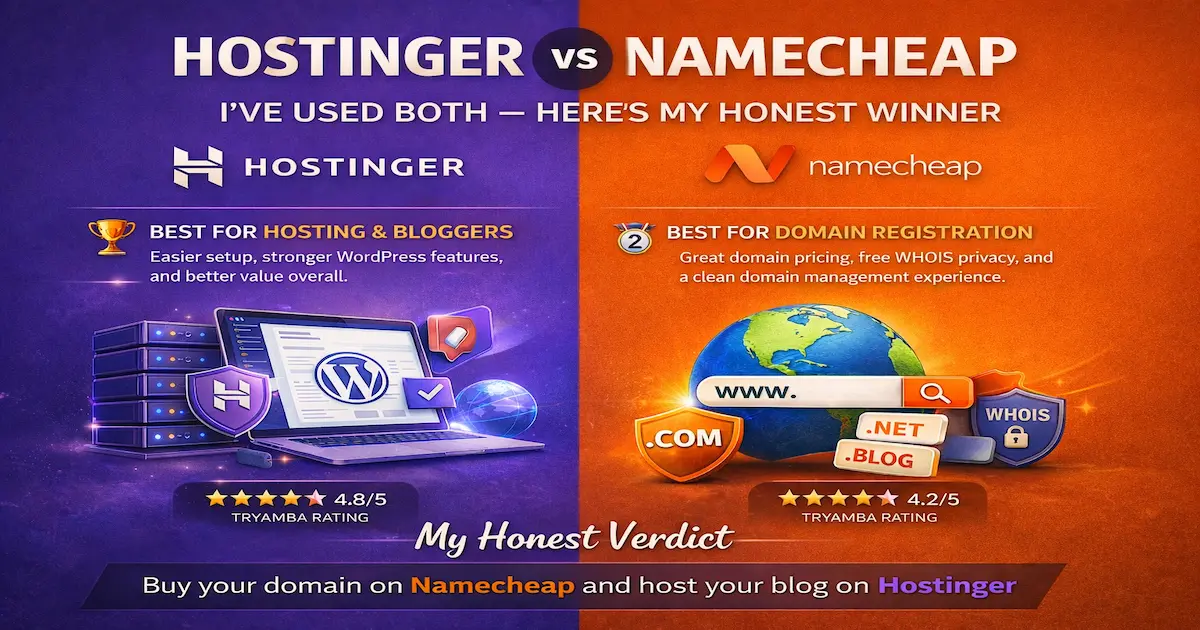
These two tools aren’t identical competitors — Hostinger dominates on hosting while Namecheap rules on domain registration. For bloggers, Hostinger wins by a clear margin.
🏆 Best for Hosting & Bloggers: Hostinger — Faster servers, better WordPress tools, and more value per dollar for anyone building a blog or website.
🥈 Best for Domain Registration: Namecheap — Unbeatable domain prices, free WHOIS privacy, and the best place to manage your domains.
| Hostinger vs Namecheap | Hostinger | Namecheap |
|---|---|---|
| Overall Rating | ⭐⭐⭐⭐⭐ 4.8/5 | ⭐⭐⭐⭐ 4.2/5 |
What Is Hostinger & What Is Namecheap?
Hostinger launched in 2004 and grew into one of the world’s largest hosting companies, now serving over 3 million websites globally. Think of it like a fully furnished apartment — you get the space, the infrastructure, the security, and all the tools you need to move in and go live immediately. Hosting is their entire identity, and it shows in every feature they build.
Namecheap started in 2000 as a domain registrar — essentially a shop where you buy your website’s address (like yourname.com). They added hosting later, but domains are still their bread and butter. If Hostinger is a furnished apartment, Namecheap is a great real estate agent who also rents out a few basic rooms on the side.
The key difference? Hostinger is built for hosting. Namecheap is built for domains. Keep that in mind as we go through each round.
Master Comparison Table
| Feature | Hostinger | Namecheap |
|---|---|---|
| Starting Price | ~$2.99/mo | ~$1.58/mo |
| Renewal Price | ~$7.99/mo | ~$4.48/mo |
| Hosting Type | Shared, Cloud, VPS, WordPress | Shared, WordPress (EasyWP) |
| Speed / Performance | LiteSpeed + NVMe SSD | Apache/LiteSpeed + SSD |
| Uptime Guarantee | 99.9% | 99.9% |
| Free Domain Included | ✅ (with most plans) | ❌ (discount only) |
| Free SSL | ✅ Lifetime | ✅ First year only |
| Domain Registration | Secondary feature | ✅ Core strength |
| WordPress Hosting | ✅ Dedicated plans + staging | ✅ EasyWP (basic) |
| Staging Environment | ✅ | ❌ |
| Customer Support | 24/7 Live Chat (fast) | 24/7 Live Chat (decent) |
| Best For | Bloggers, WordPress sites, growth | Domain buying, basic sites |
| Overall Rating ⭐ | 4.8/5 | 4.2/5 |
| 🏆 Winner | Hosting | Domains |
Namecheap wins on domains. Hostinger wins on hosting. Keep reading to see which one you actually need.
Round 1: Pricing & Value for Money
Price is usually the first thing beginners check — and it’s also where the most confusion happens.
Hostinger starts at around $2.99/month on their Premium Shared Hosting plan (with a 48-month commitment). That includes a free domain, free lifetime SSL, and their full hPanel dashboard. Renewal rates jump to around $7.99/month — something to factor in.
Namecheap looks cheaper upfront at $1.58/month for their Stellar plan. But here’s the catch: SSL is only free for the first year (then ~$9/year), there’s no free domain included, and renewal rates hover around $4.48/month. Once you add those extras up, the “cheap” label gets murkier.
For pure long-term value — especially for a blogger who needs SSL, a domain, and solid hosting in one package — Hostinger gives you more for your money. I did a full breakdown in my Hostinger Review if you want the exact numbers.
Winner: Hostinger
Round 2: Speed & Performance
Speed directly affects your Google rankings and how long visitors stay on your site. A one-second delay can increase your bounce rate by up to 32%.
Hostinger runs on LiteSpeed servers with NVMe SSD storage. Think of LiteSpeed as a sports car engine compared to the bicycle Apache uses — it processes requests significantly faster, especially under traffic spikes. NVMe storage is the newest, fastest type of drive available, roughly 5x quicker than standard SSDs.
Namecheap uses a mix of Apache and LiteSpeed depending on the plan, paired with regular SSD storage. It’s not slow — but it’s not as consistently fast as Hostinger either. In independent speed tests, Hostinger regularly loads pages in under 1 second, while Namecheap averages around 1.2–1.8 seconds.
For a blogger trying to rank on Google, that difference is real and meaningful.
Winner: Hostinger
Round 3: WordPress Hosting Specifically
If you’re building a blog, WordPress is almost certainly your platform — so this round matters most.
Hostinger has dedicated WordPress hosting plans starting around $2.99/month. You get one-click WordPress installation, automatic updates, a staging environment (to test changes before going live), and LiteSpeed caching built in. Their hPanel makes managing WordPress feel almost foolproof, even for beginners.
Namecheap offers WordPress hosting through their EasyWP platform, starting at $9.88/month — significantly more expensive for what you get. EasyWP is clean and simple, but it lacks staging, has fewer customization options, and the performance ceiling is lower. It’s fine for a basic personal site, but it’s not built to scale with a growing blog.
For any serious WordPress blogger, Hostinger is the stronger choice here — more features, better performance, and lower cost.
Winner: Hostinger
Round 4: Ease of Use & Dashboard
For a total beginner, the dashboard experience can make or break your first week.
Hostinger uses their custom-built hPanel — and I’ll be honest, it’s one of the cleanest hosting dashboards I’ve ever used. Everything is logically grouped, the icons are intuitive, and setting up a new WordPress blog takes under 10 minutes. There’s no overwhelming list of technical options staring you in the face.
Namecheap uses cPanel for shared hosting, which is the industry standard — but it’s showing its age. It works, and millions of people use it, but for a complete beginner it can feel cluttered and intimidating. Their EasyWP interface for WordPress hosting is simpler, but also more limited.
If you’ve never managed hosting before, Hostinger’s hPanel will make your life noticeably easier from day one.
Winner: Hostinger
📬 Enjoying This Breakdown? Join 1,000+ bloggers who get Tryamba’s honest tool reviews every week. No spam, no fluff — just real advice that helps you build and grow. Subscribe Free
Round 5: Domain Registration & Management
Now we’re on Namecheap’s home turf — and I’ll give credit where it’s due.
Namecheap is genuinely excellent for buying and managing domains. Their .com prices are consistently competitive (around $8.98/year vs GoDaddy’s $17.99/year). They include free WHOIS privacy protection on every domain — something many registrars charge $10–15/year extra for. Their DNS management panel is clean, fast, and easy to navigate even for beginners. See my full Namecheap Review for the complete picture.
Hostinger sells domains too, but it’s secondary to their hosting business. Domain prices are slightly higher, and the domain management experience isn’t as polished.
One question I see constantly: “Can I buy a domain on Namecheap and host on Hostinger?” — Yes, absolutely. You just update the nameservers in your Namecheap dashboard to point to Hostinger. It takes about 5 minutes and works seamlessly. Many bloggers do exactly this to get the best of both worlds.
Winner: Namecheap
Round 6: Customer Support
Beginners need support more than anyone — and the quality of help you get at 2am when your site is down matters enormously.
Hostinger offers 24/7 live chat support with consistently fast response times (typically under 2 minutes in my experience). Their agents are generally knowledgeable, and they have an extensive knowledge base for self-service. I’ve contacted them several times over the years and rarely walked away frustrated.
Namecheap also offers 24/7 live chat and a ticketing system. The response time is decent but can slow down during peak hours. Their support quality is good for domain-related issues — it’s their specialty after all — but for complex hosting problems I’ve found the answers less reliable.
For a beginner who might need help frequently, Hostinger edges ahead on consistency and speed.
Winner: Hostinger
Round 7: Security Features
Security isn’t glamorous, but one malware attack or data breach can take your blog down permanently.
Hostinger includes a solid security stack on most plans: free lifetime SSL, weekly backups (daily on higher plans), malware scanner, a web application firewall, and DDoS protection — all built in at no extra cost. For a beginner, this is huge because you don’t have to think about piecing together security yourself.
Namecheap includes free SSL for the first year (then paid), basic DDoS protection, and their hosting plans come with limited backup options. More advanced security features like malware scanning are either limited or require upgrading to higher-tier plans.
If you want peace of mind without paying extra for it, Hostinger’s out-of-the-box security package is more generous.
Winner: Hostinger
Who Should Choose Hostinger?
- Beginner bloggers launching their first WordPress site and want everything set up in one place without technical headaches
- Content creators and affiliate marketers who need fast page speeds to rank on Google and reduce bounce rates
- Bloggers planning to grow who need staging environments, multi-site support, and room to scale without switching hosts later
- Anyone who wants an all-in-one deal — domain, SSL, and hosting bundled at a low price without hunting for add-ons
- First-time website owners who will likely need support and want fast, reliable live chat help available around the clock
If any of those sound like you, start your journey with my guide on How to Start a Blog — it walks you through setting up on Hostinger step by step.
Who Should Choose Namecheap?
- Anyone primarily buying a domain who wants the best price with free WHOIS privacy included — Namecheap is genuinely hard to beat here
- Developers or tech-savvy users who are comfortable with cPanel and prefer a familiar, established interface
- People running a small personal or portfolio website with low traffic where basic hosting is more than enough
- Bloggers who already have hosting and just need a reliable, affordable place to register and manage their domains
FAQ
Is Namecheap good for WordPress hosting?
Namecheap’s EasyWP platform is functional for basic WordPress sites, but it lacks staging environments, has limited scalability, and costs more than Hostinger’s WordPress plans. For a serious blog, Hostinger is the stronger choice.
Which is faster — Hostinger or Namecheap?
Hostinger is consistently faster thanks to LiteSpeed servers and NVMe SSD storage. In most independent speed tests, Hostinger loads pages under 1 second while Namecheap averages 1.2–1.8 seconds — a meaningful difference for SEO and user experience.
Can I buy a domain on Namecheap and host on Hostinger?
Yes, absolutely — and many bloggers do exactly this. Simply purchase your domain on Namecheap, then update the nameservers in your Namecheap dashboard to point to Hostinger. The process takes about 5 minutes and works seamlessly.
Is Hostinger cheaper than Namecheap in the long run?
It depends on what you’re comparing. For hosting alone, Hostinger delivers more value because SSL is free for life and a domain is included. Namecheap’s intro price looks lower, but once you add SSL renewal and domain registration costs, Hostinger often comes out cheaper overall.
Which hosting is better for beginner bloggers in 2026?
Hostinger is the better choice for beginner bloggers in 2026. It offers easier setup, faster speeds, better WordPress tools, and stronger security — all at a competitive price. It’s the hosting I recommend to anyone starting their first blog from scratch.
Final Verdict: Here’s My Honest Winner
After using both platforms for years, the answer is clear: Hostinger wins for hosting, and it’s not particularly close.
It’s faster, more beginner-friendly, better equipped for WordPress, and delivers more value per dollar once you factor in what’s included. The only area Namecheap genuinely beats it is domain registration — and that’s a specific use case, not a reason to choose it as your host.
My recommendation: buy your domain on Namecheap, host your blog on Hostinger. You get the best of both worlds for under $5/month combined.
Still not sure which setup is right for your specific situation? Drop your question in the comments, and I’ll point you in the right direction.